eifinger / hass-weenect
Homeassistant integration for weenect
★ 25 stars
⑂ 4 forks
👁 25 watching
⚖️ MIT License
hacktoberfesthacshome-assistanthome-assistant-hacshomeassistanthomeassistant-integrationpythonweenect
📥 Clone
https://github.com/eifinger/hass-weenect.git

📂 main
View all commits →


📄 README.md
weenect






 Homeassistant Custom Component for https://my.weenect.com/.
This component will set up the following platforms.
Platform | Description
-- | --
Homeassistant Custom Component for https://my.weenect.com/.
This component will set up the following platforms.
Platform | Description
-- | --
binary_sensor | Adds sensors to show the connection status of your trackers.
button | Shortcuts to service. Activate Super Live Mode, Ring, Vibrate and Request a Location Update.
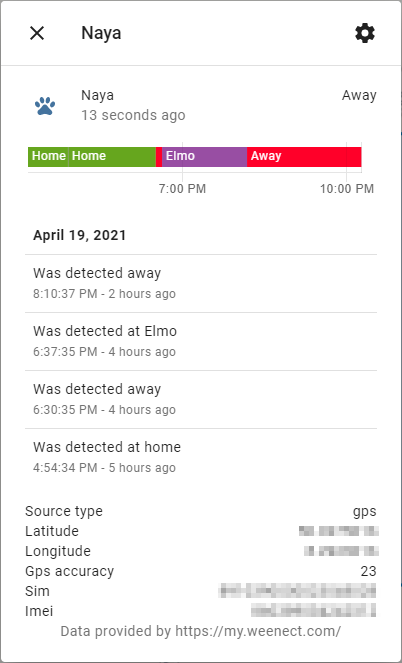
device_tracker | Adds your trackers as device_trackers so they appear on the map.
select | Select the update interval.
sensor | Adds sensors like signal and battery strength of your trackers.

Services
weenect.setupdateinterval
Set the tracker update interval. Disable tracking by setting interval to 0S. Name | Description | Example -- | -- | --update_interval | The GPS update interval. Possible values are 0S, 30S, 1M, 2M, 3M, 5M, 10M. 0S disables tracking. Battery life will be low for 30S and 1M, high for 2M and 3M and medium for 5M and 10M. | 10M
weenect.activatesuperlive
Activate the super live mode.weenect.refresh_location
Request a location update.weenect.ring
Let the tracker ring.weenect.vibrate
Let the tracker vibrate.Installation
HACS
The easiest way to add this to your Homeassistant installation is using HACS.Manual
- Using the tool of choice open the directory (folder) for your HA configuration (where you find
configuration.yaml).
- If you do not have a
custom_componentsdirectory (folder) there, you need to create it.
- In the
custom_componentsdirectory (folder) create a new folder calledweenect.
- Download all the files from the
custom_components/weenect/directory (folder) in this repository.
- Place the files you downloaded in the new directory (folder) you created.
- Restart Home Assistant
- In the HA UI go to "Configuration" -> "Integrations" click "+" and search for "Blueprint"
text
custom_components/weenect/__init__.py
custom_components/weenect/button.py
custom_components/weenect/binary_sensor.py
custom_components/weenect/config_flow.py
custom_components/weenect/const.py
custom_components/weenect/device_tracker.py
custom_components/weenect/entity.py
custom_components/weenect/manifest.json
custom_components/weenect/select.py
custom_components/weenect/sensor.py
custom_components/weenect/services.py
custom_components/weenect/services.yaml
custom_components/weenect/translations/en.json
`
## Automations

I have configured the following two automations to save battery on the tracker without having it to turn on/off by hand:
`yaml
---
automation:
- id: 743b7e7d-ffa8-4fa3-9c1c-62d9ada9ced8
alias: "Setze Nayas Tracker Updaterate auf 1M wenn wir unterwegs sind"
description: "Set Nayas tracker update rate to 1m when we are not at home"
mode: single
initial_state: true
trigger:
- platform: state
entity_id: input_boolean.is_home
from: "on"
to: "off"
action:
- service: weenect.set_update_interval
target:
entity_id: device_tracker.naya
data:
update_interval: "1M"
- id: 652b4b69-c951-4861-8b7d-3cbb15fc8b79
alias: "Setze Nayas Tracker Updaterate auf 0S wenn wir zu Hause sind"
description: "Set Nayas tracker update rate to 0s (disable tracking) when we are at home"
mode: single
initial_state: true
trigger:
- platform: state
entity_id: input_boolean.is_home
from: "off"
to: "on"
action:
- service: weenect.set_update_interval
target:
entity_id: device_tracker.naya
data:
update_interval: "0S"
```
