fffonion / tplink-plug-exporter
TP-Link Smart Plug Prometheus Exporter
★ 133 stars
⑂ 23 forks
👁 133 watching
⚖️ BSD 2-Clause "Simplified" License
prometheus-exportersmart-hometplinktplink-kasa
📥 Clone
https://github.com/fffonion/tplink-plug-exporter.git

📂 a39b3b2197456f09248aa1fda32ea2d530032eb6
View all commits →
📄 README.md
tplink-plug-exporter
Export TP-Link Smart Plug metrics to grafana dashboard
Install
Download from releases or run from docker
docker run -d -p 9233:9233 fffonion/tplink-plug-exporterUsage
Use the -h flag to see full usage:$ tplink-plug-exporter -h
Usage of tplink-plug-exporter:
-metrics.listen-addr string
listen address for tplink-plug exporter (default ":9233")Grafana dashboard
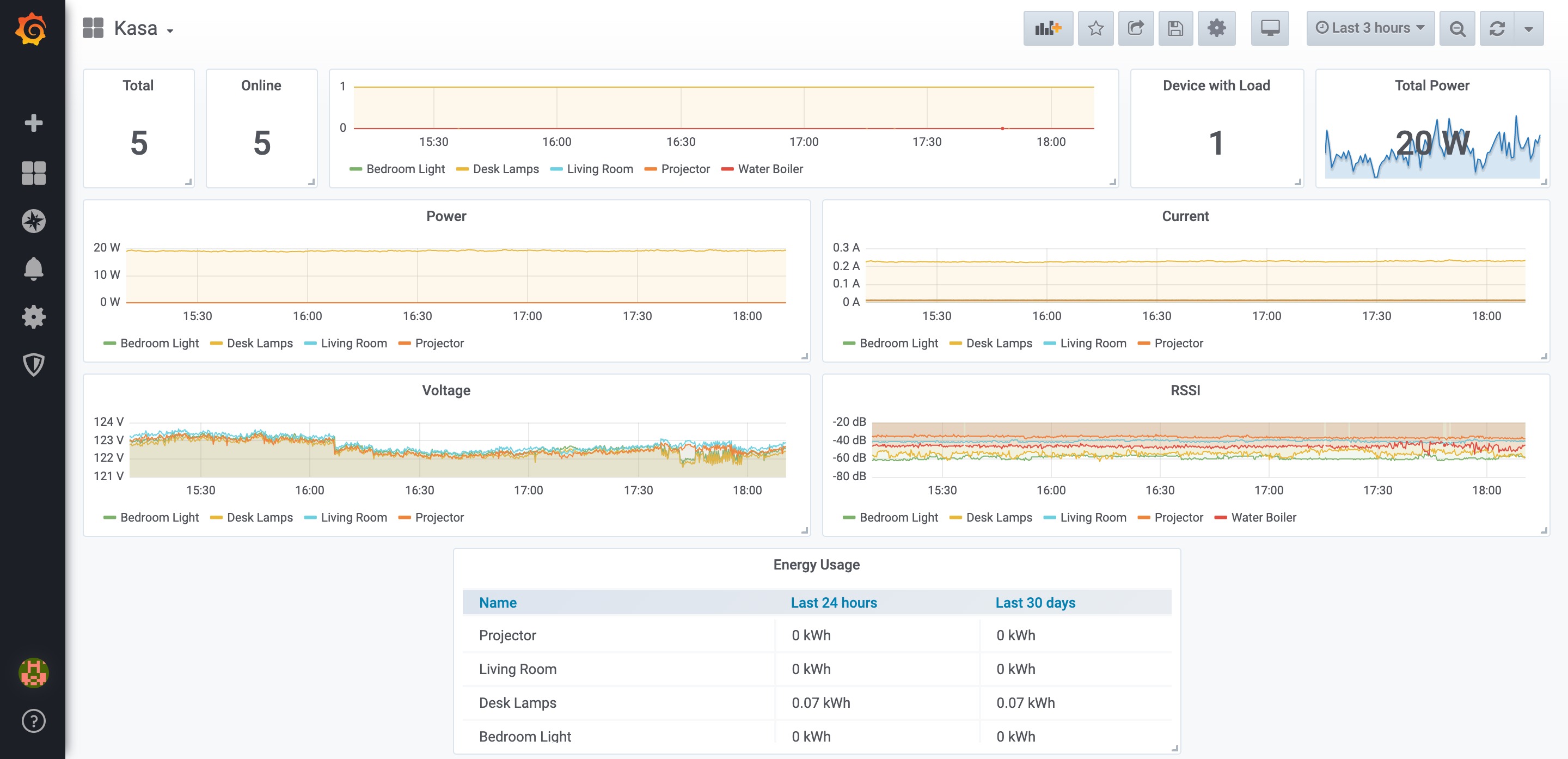
Search for Kasa inside grafana or install from https://grafana.com/grafana/dashboards/10957
Sample prometheus config
# scrape kasa devices
scrape_configs:
  - job_name: 'kasa'
    static_configs:
    - targets:
      # IP of your smart plugs
      - 192.168.0.233
      - 192.168.0.234
    metrics_path: /scrape
    relabel_configs:
      - source_labels : [__address__]
        target_label: __param_target
      - source_labels: [__param_target]
        target_label: instance
      - target_label: __address__
        # IP of the exporter
        replacement: localhost:9233

# scrape kasa_exporter itself
  - job_name: 'kasa_exporter'
    static_configs:
      - targets:
        # IP of the exporter
        - localhost:9233
Docker Build Instructions
Build for both arm64 and amd64:
docker build -t <image-name>:latest-arm64 --platform linux/arm64 --build-arg GOARCH=arm64 .
docker build -t <image-name>:latest-amd64 --platform linux/amd64 --build-arg GOARCH=amd64 .
Merge them in one manifest:
docker manifest create <image-name>:latest --amend <image-name>:latest-arm64 --amend <image-name>:latest-amd64
docker manifest push <image-name>:latest
See also
- Original reverse engineering work: https://github.com/softScheck/tplink-smartplug
