1
2
3
4
5
6
7
8
9
10
11
12
13
14
15
16
17
18
19
20
21
22
23
24
25
26
27
28
29
30
31
32
33
34
35
36
37
38
39
40
41
42
43
44
45
46
47
48
49
50
51
52
53
54
55
56
57
58
59
60
61
62
63
64
65
66
67
68
69
70
71
72
73
74
75
76
77
78
79
80
81
82
83
84
85
86
87
88
89
90
91
92
93
94
95
96
97
98
99
100
101
102
103
104
105
106
107
108
109
110
111
112
113
114
115
116
117
118
119
120
121
122
123
124
125
126
127
128
129
130
131
132
133
134
135
136
137
138
139
140
141
142
143
144
145
146
147
148
149
150
151
152
153
154
155
156
157
158
159
160
161
162
163
164
165
166
167
168
169
170
171
172
173
174
175
176
177
178
179
180
181
182
183
184
185
186
187
188
189
190
191
192
193
194
195
196
197
198
199
200
201
202
203
204
205
206
207
208
209
210
211
212
213
214
215
216
217
218
219
220
221
222
223
224
225
226
227
228
229
230
231
232
233
234
235
236
237
238
239
240
241
242
243
244
245
246
247
248
249
250
251
252
253
254
255
256
257
258
259
260
261
262
263
264
265
266
267
268
269
270
271
272
273
274
275
276
277
278
279
280
281
282
283
284
285
286
287
288
289
290
291
292
293
294
295
296
297
298
299
300
301
302
303
304
305
306> [!WARNING]
>
> **`ruff-lsp` is deprecated. Please switch to the native language server
> (`ruff server`). Refer to the [setup
> guide](https://docs.astral.sh/ruff/editors/setup/) on how to set up the
> native language server and the [migration
> guide](https://docs.astral.sh/ruff/editors/migration/) on how to migrate the
> settings.**
>
> **Feel free to comment on the [GitHub
> discussion](https://github.com/astral-sh/ruff/discussions/15991) to ask
> questions or share feedback.**
# ruff-lsp
[](https://github.com/astral-sh/ruff)
[](https://pypi.python.org/pypi/ruff-lsp)
[](https://pypi.python.org/pypi/ruff-lsp)
[](https://pypi.python.org/pypi/ruff-lsp)
[](https://github.com/astral-sh/ruff-lsp/actions)
> [!NOTE]
>
> **As of Ruff v0.4.5, Ruff ships with a built-in language server written in Rust: ⚡ `ruff server` ⚡**
>
> **`ruff server` supports the same feature set as `ruff-lsp`, but with superior performance and no
> installation required. `ruff server` was marked as stable in Ruff v0.5.3.**
>
> **See the [documentation](https://docs.astral.sh/ruff/editors/) for more.**
A [Language Server Protocol](https://microsoft.github.io/language-server-protocol/) implementation for
[Ruff](https://github.com/astral-sh/ruff), an extremely fast Python linter and code formatter,
written in Rust.
Ruff can be used to replace Flake8 (plus dozens of plugins), Black, isort, pyupgrade, and more,
all while executing tens or hundreds of times faster than any individual tool.
`ruff-lsp` enables Ruff to be used in any editor that supports the LSP, including [Neovim](#example-neovim),
[Sublime Text](#example-sublime-text), Emacs and more. For Visual Studio Code, check out the
[Ruff VS Code extension](https://github.com/astral-sh/ruff-vscode).
`ruff-lsp` supports surfacing Ruff diagnostics and providing Code Actions to fix them, but is
intended to be used alongside another Python LSP in order to support features like navigation and
autocompletion.
## Highlights
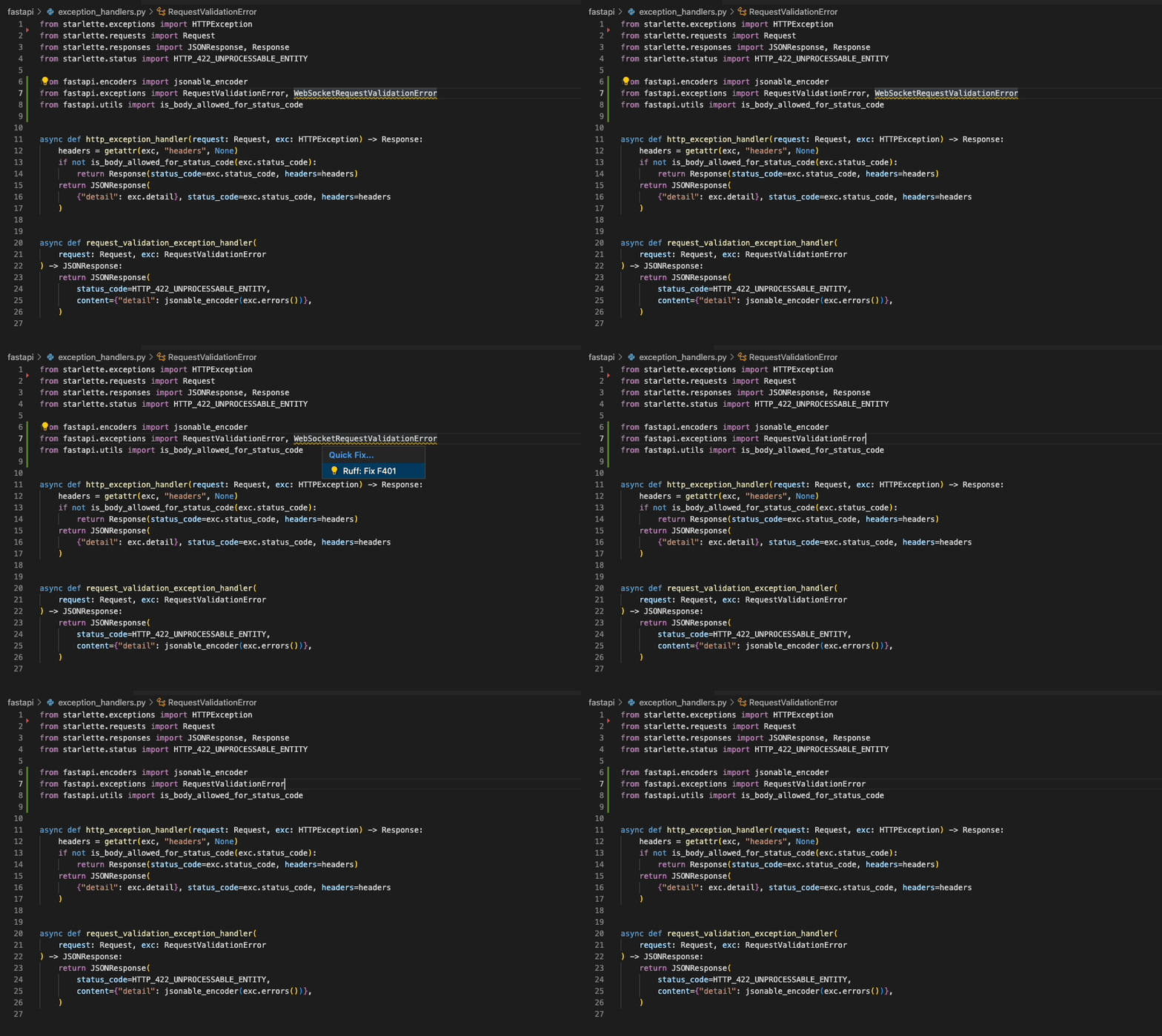
### "Quick Fix" actions for auto-fixable violations (like unused imports)
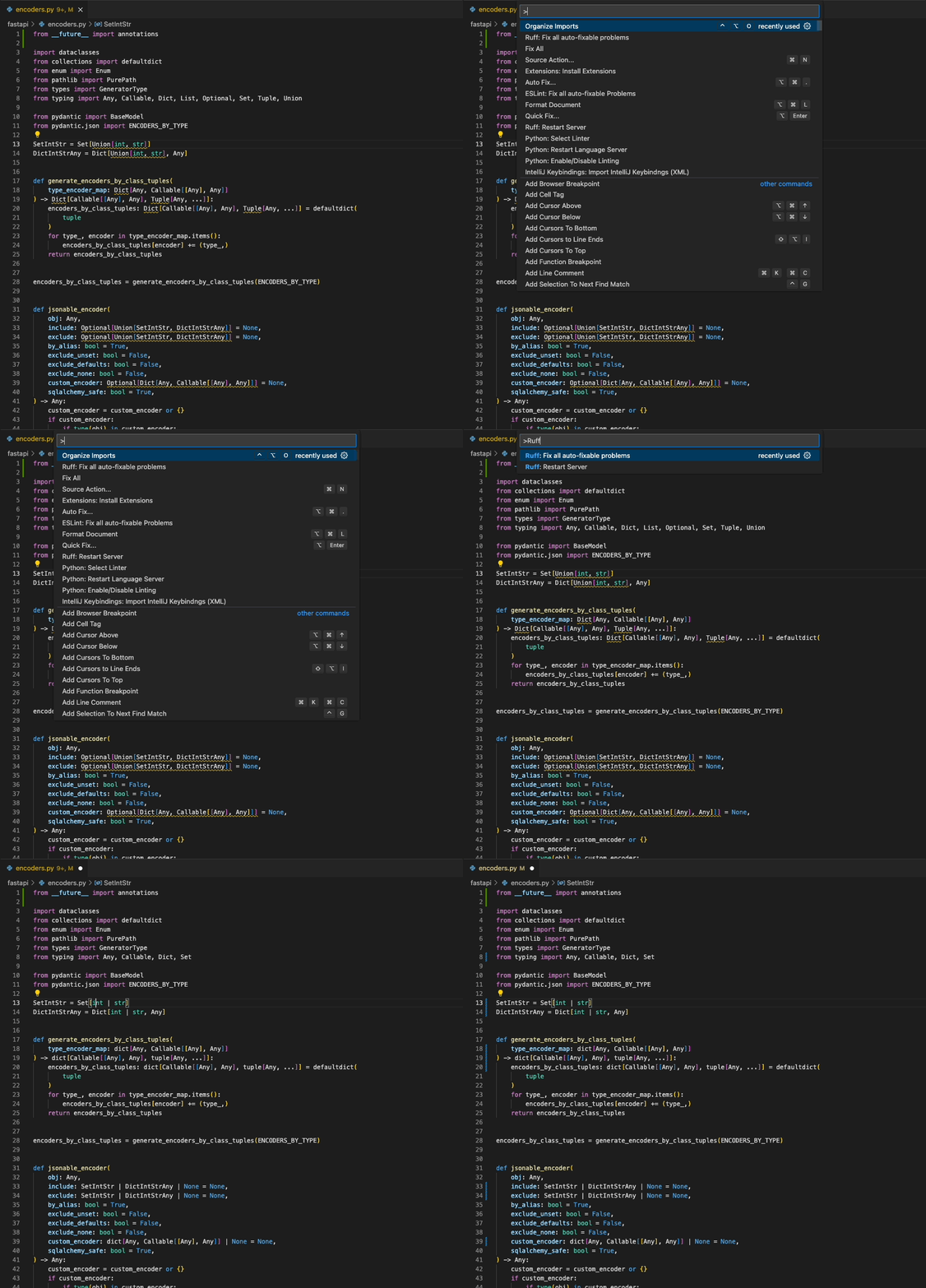
### "Fix all": automatically fix all auto-fixable violations
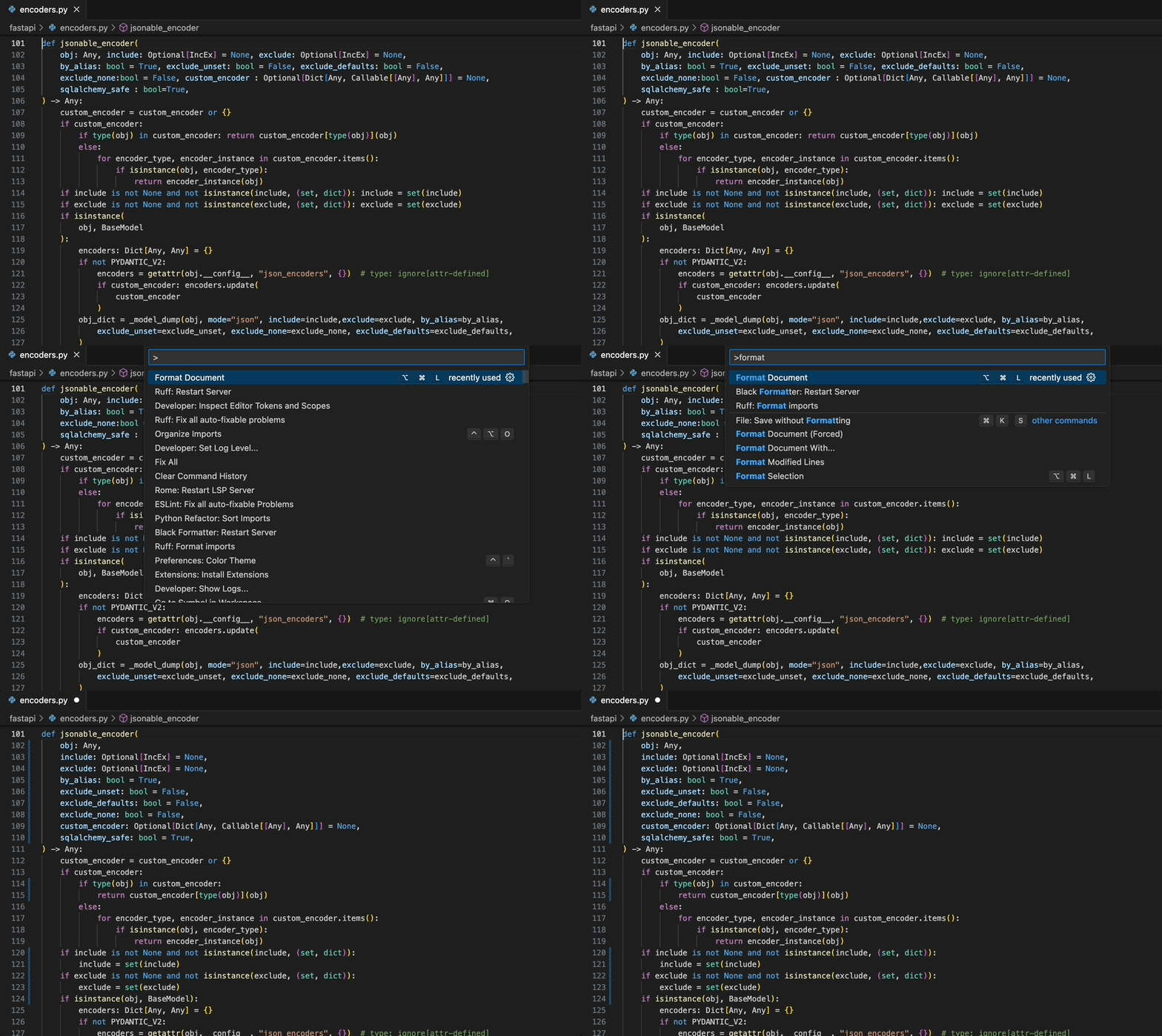
### "Format Document": Black-compatible code formatting
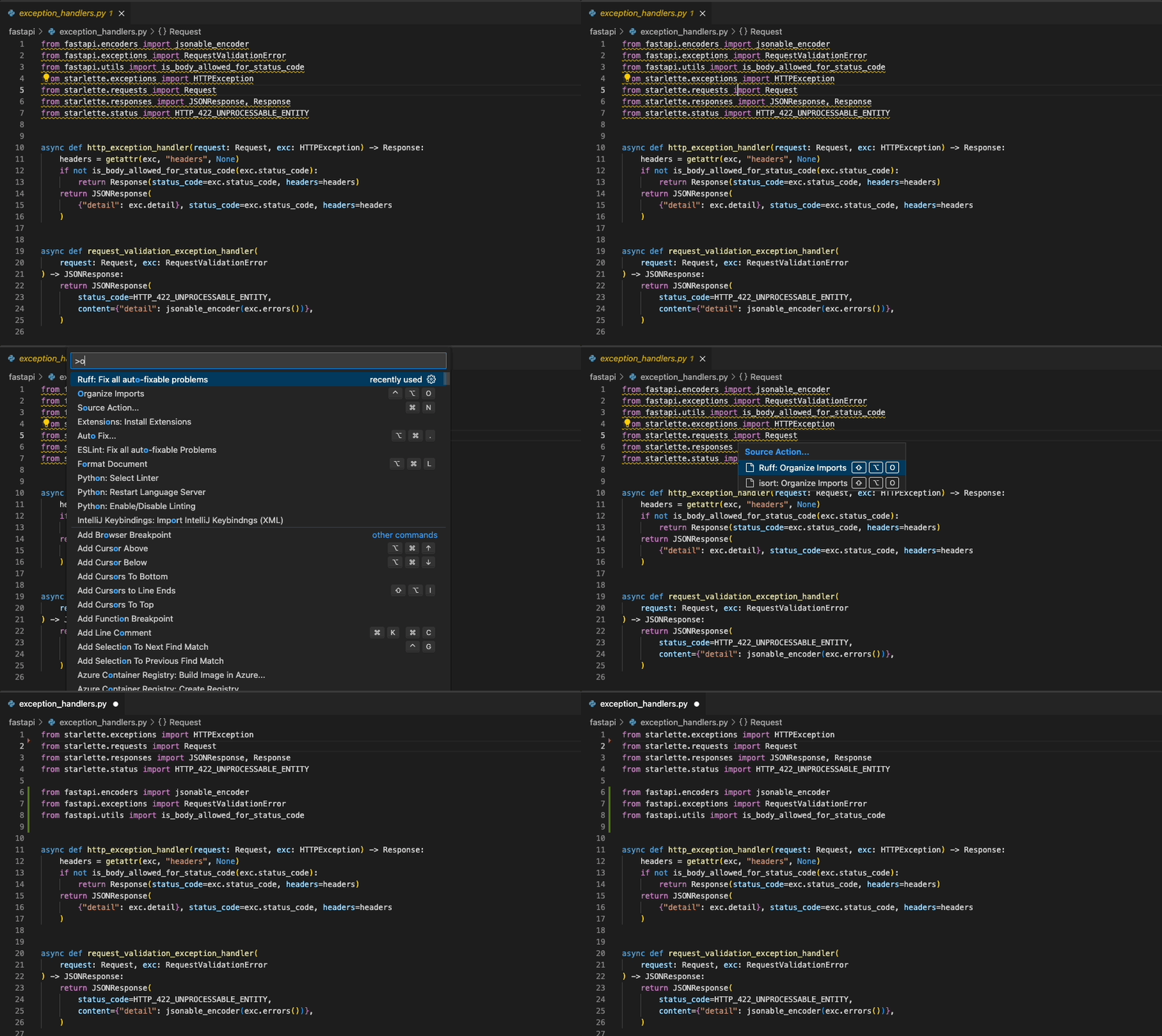
### "Organize Imports": `isort`-compatible import sorting
## Installation
`ruff-lsp` is available as [`ruff-lsp`](https://pypi.org/project/ruff-lsp/) on PyPI:
```shell
pip install ruff-lsp
```
### Community packages
[An Alpine Linux package](https://pkgs.alpinelinux.org/packages?name=ruff-lsp)
is available in the `testing` repository:
apk add ruff-lsp
[An Arch Linux package](https://archlinux.org/packages/extra/any/ruff-lsp/) is
available in the `Extra` repository:
pacman -S ruff-lsp
## Setup
Once installed, `ruff-lsp` can be used with any editor that supports the Language Server Protocol,
including Neovim, Emacs, Sublime Text, and more.
### Example: Neovim
To use `ruff-lsp` with Neovim, follow these steps:
1. Install `ruff-lsp` from PyPI along with [`nvim-lspconfig`](https://github.com/neovim/nvim-lspconfig).
2. Set up the Neovim LSP client using the [suggested configuration](https://github.com/neovim/nvim-lspconfig/tree/master#configuration) (`:h lspconfig-keybindings`).
3. Finally, configure `ruff-lsp` in your `init.lua`:
```lua
-- Configure `ruff-lsp`.
-- See: https://github.com/neovim/nvim-lspconfig/blob/master/doc/configs.md#ruff_lsp
-- For the default config, along with instructions on how to customize the settings
require('lspconfig').ruff_lsp.setup {
init_options = {
settings = {
-- Any extra CLI arguments for `ruff` go here.
args = {},
}
}
}
```
Upon successful installation, you should see Ruff's diagnostics surfaced directly in your editor:

Note that if you're using Ruff alongside another LSP (like Pyright), you may want to defer to that
LSP for certain capabilities, like `textDocument/hover`:
```lua
local on_attach = function(client, bufnr)
if client.name == 'ruff_lsp' then
-- Disable hover in favor of Pyright
client.server_capabilities.hoverProvider = false
end
end
require('lspconfig').ruff_lsp.setup {
on_attach = on_attach,
}
```
And, if you'd like to use Ruff exclusively for linting, formatting, and organizing imports, you can
disable those capabilities in Pyright:
```lua
require('lspconfig').pyright.setup {
settings = {
pyright = {
-- Using Ruff's import organizer
disableOrganizeImports = true,
},
python = {
analysis = {
-- Ignore all files for analysis to exclusively use Ruff for linting
ignore = { '*' },
},
},
},
}
```
Ruff also integrates with [`coc.nvim`](https://github.com/neoclide/coc.nvim/wiki/Language-servers#using-ruff-lsp):
```json
{
"languageserver": {
"ruff-lsp": {
"command": "ruff-lsp",
"filetypes": [
"python"
]
}
}
}
```
### Example: Sublime Text
To use `ruff-lsp` with Sublime Text, install Sublime Text's [LSP](https://github.com/sublimelsp/LSP)
and [LSP-ruff](https://github.com/sublimelsp/LSP-ruff) package.
Upon successful installation, you should see errors surfaced directly in your editor:

### Example: Helix
To use `ruff-lsp` with [Helix](https://helix-editor.com/), add something like the following to
`~/.config/helix/languages.toml` (in this case, with `auto-format` enabled):
```toml
[language-server.ruff]
command = "ruff-lsp"
[[language]]
name = "python"
language-servers = [ "ruff" ]
auto-format = true
```
Upon successful installation, you should see errors surfaced directly in your editor:
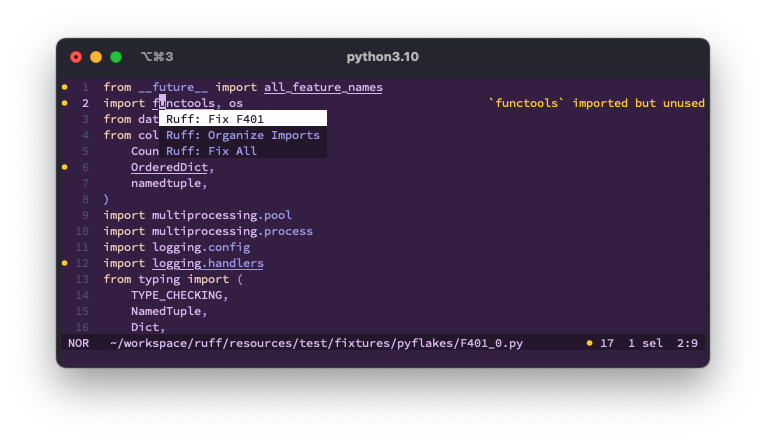
As of v23.10, Helix supports the use of multiple language servers for a given language. This
enables, for example, the use of `ruff-lsp` alongside a language server like `pyright`:
```toml
[[language]]
name = "python"
language-servers = [ "pyright", "ruff" ]
[language-server.ruff]
command = "ruff-lsp"
[language-server.ruff.config.settings]
args = ["--ignore", "E501"]
```
### Example: Lapce
To use `ruff-lsp` with [Lapce](https://lapce.dev/), install the [`lapce-ruff-lsp`](https://plugins.lapce.dev/plugins/abreumatheus/lapce-ruff-lsp)
plugin (which wraps `ruff-lsp`) from the Lapce plugins panel.
Upon successful installation, you should see errors surfaced directly in your editor:

### Example: Kate
To use `ruff-lsp` with [Kate](https://kate-editor.org/), add something like the following to
the LSP client's `settings.json`:
```json
{
"servers": {
"python": {
"command": ["ruff-lsp"],
"url": "https://github.com/astral-sh/ruff-lsp",
"highlightingModeRegex": "^Python$"
}
}
}
```
## Fix safety
Ruff's automatic fixes are labeled as "safe" and "unsafe". By default, the "Fix all" action will not apply unsafe
fixes. However, unsafe fixes can be applied manually with the "Quick fix" action. Application of unsafe fixes when
using "Fix all" can be enabled by setting `unsafe-fixes = true` in your Ruff configuration file or adding
`--unsafe-fixes` flag to the "Lint args" setting.
See the [Ruff fix docs](https://docs.astral.sh/ruff/linter/#fix-safety) for more details on how fix
safety works.
## Jupyter Notebook Support
`ruff-lsp` has support for Jupyter Notebooks via the [Notebook Document Synchronization] capabilities of the Language
Server Protocol which were added in 3.17. This allows `ruff-lsp` to provide full support for all of the existing capabilities
available for Python files in Jupyter Notebooks, including diagnostics, code actions, and formatting.
This requires clients, such as Visual Studio Code, to support the notebook-related capabilities. In addition to the editor support,
it also requires Ruff version `v0.1.3` or later.
[Notebook Document Synchronization]: https://microsoft.github.io/language-server-protocol/specifications/lsp/3.17/specification/#notebookDocument_synchronization
## Settings
The exact mechanism by which settings will be passed to `ruff-lsp` will vary by editor. However,
the following settings are supported:
| Settings | Default | Description |
|--------------------------------------|----------|--------------------------------------------------------------------------------------------------------------------------------------------------------------------------------------------------------------------------------------------------------------------|
| codeAction.disableRuleComment.enable | `true` | Whether to display Quick Fix actions to disable rules via `noqa` suppression comments. |
| codeAction.fixViolation.enable | `true` | Whether to display Quick Fix actions to autofix violations. |
| fixAll | `true` | Whether to register Ruff as capable of handling `source.fixAll` actions. |
| format.args | `[]` | Additional command-line arguments to pass to `ruff format`, e.g., `"args": ["--config=/path/to/pyproject.toml"]`. Supports a subset of Ruff's command-line arguments, ignoring those that are required to operate the LSP, like `--force-exclude` and `--verbose`. |
| ignoreStandardLibrary | `true` | Whether to ignore files that are inferred to be part of the Python standard library. |
| interpreter | `[]` | Path to a Python interpreter to use to run the linter server. |
| lint.args | `[]` | Additional command-line arguments to pass to `ruff check`, e.g., `"args": ["--config=/path/to/pyproject.toml"]`. Supports a subset of Ruff's command-line arguments, ignoring those that are required to operate the LSP, like `--force-exclude` and `--verbose`. |
| lint.enable | `true` | Whether to enable linting. Set to `false` to use Ruff exclusively as a formatter. |
| lint.run | `onType` | Run Ruff on every keystroke (`onType`) or on save (`onSave`). |
| logLevel | `error` | Sets the tracing level for the extension: `error`, `warn`, `info`, or `debug`. |
| organizeImports | `true` | Whether to register Ruff as capable of handling `source.organizeImports` actions. |
| path | `[]` | Path to a custom `ruff` executable, e.g., `["/path/to/ruff"]`. |
| showSyntaxErrors | `true` | Whether to show syntax error diagnostics. _New in Ruff v0.5.0_ |
## Development
- Install [`just`](https://github.com/casey/just), or see the `justfile` for corresponding commands.
- Create and activate a virtual environment (e.g., `python -m venv .venv && source .venv/bin/activate`).
- Install development dependencies (`just install`). To run the `test_format.py` test, you need to install a custom ruff build with `--features format`, e.g. `maturin develop --features format -m ../ruff/crates/ruff_cli/Cargo.toml`.
- To automatically format the codebase, run: `just fmt`.
- To run lint and type checks, run: `just check`.
- To run tests, run: `just test`. This is just a wrapper around pytest, which you can use as usual.
## Release
- Bump the version in `ruff_lsp/__init__.py`.
- Make sure you use Python 3.7 installed and as your default Python.
- Run `python -m venv .venv` to create a venv and activate it.
- Run `python -m pip install pip-tools` to install `pip-tools`.
- Run `rm requirements.txt requirements-dev.txt` and then `just lock` to update ruff.
- Create a new PR and merge it.
- [Create a new Release](https://github.com/astral-sh/ruff-lsp/releases/new), enter `v0.0.x` (where `x` is the new version) into the *Choose a tag* selector. Click *Generate release notes*, curate the release notes and publish the release.
- The Release workflow publishes the LSP to PyPI.
## License
MIT
<div align="center">
<a target="_blank" href="https://astral.sh" style="background:none">
<img src="https://raw.githubusercontent.com/astral-sh/ruff/main/assets/svg/Astral.svg">
</a>
</div>