1
2
3
4
5
6
7
8
9
10
11
12
13
14
15
16
17
18
19
20
21
22
23
24
25
26
27
28
29
30
31
32
33
34
35
36
37
38
39
40
41
42
43
44
45
46
47
48
49
50
51
52
53
54
55
56
57
58
59
60
61
62
63
64
65
66
67
68
69
70
71
72
73
74
75
76
77
78
79
80
81
82
83
84
85
86
87
88
89
90
91
92
93
94
95
96
97
98
99
100
101
102
103
104
105
106
107
108
109
110
111
112
113
114
115
116
117
118
119
120
121
122
123
124
125
126
127
128
129
130
131
132
133
134
135
136
137
138
139
140
141
142
143
144
145
146
147
148
149
150
151
152
153
154
155
156
157
158
159
160
161
162
163
164
165
166
167
168
169
170
171
172
173
174
175
176
177
178
179
180
181
182
183
184
185
186
187
188
189
190
191
192
193
194
195
196
197
198
199
200
201
202
203
204
205
206
207
208
209
210
211
212
213
214
215
216
217
218
219
220
221
222
223
224
225
226
227
228
229
230
231
232
233
234
235
236
237
238
239
240
241
242
243
244
245
246
247
248
249
250
251
252
253
254
255
256
257
258
259
260
261
262
263
264
265
266
267
268
269
270
271
272
273
274
275
276
277
278
279
280
281
282
283
284
285
286
287
288
289
290
291
292
293
294
295
296
297
298
299
300# **Recently added features you may not know yet**
## Timeout
- Both flow and task have `timeout_seconds: Union[int, float] = None`
- `timeout_seconds` = optional number of seconds indicating a maximum runtime for the flow. If the flow exceeds this runtime, it will be marked as failed. Flow execution may continue until the next task is called
- What’s their purpose?
prevent unintentional long-running tasks
- How do they work?
- When the a task or flow runs longer than the duration specified in the `timeout_seconds`, a timeout exception is raised and the run will be marked as `Failed`.
- In the UI, the run will be visibly designated as `TimedOut`.
- Task-level timeout: From the perspective of the flow, the timed-out task will be treated like any other `Failed` task.
- Example flow
Timeout durations are specified using the `timeout_seconds` keyword argument.
```python
from prefect import task, flow
import time
@task(timeout_seconds=1)
def show_timeouts():
print("I will run")
time.sleep(5)
print("I will not run")
@flow(log_prints=True):
def main():
show_timeouts()
```
## Cancellation
- Flow run **cancellation** now `cancels` the flow run `infrastructure` process e.g. killing the local process, docker container deleting Cloud Run, ACI or K8s job, stopping an ECS task
- Related: new CLI command to cancel a flow run `prefect **flow-run cancel flow-run-id`
- How can a flow run be cancelled?
From the CLI, UI, REST API, or Python client.
- What happens when cancellation is requested?
- The flow run is moved to a "`Cancelling`" state.
- The `agent` monitors the state of flow runs and detects that cancellation has been requested.
- The agent then sends a `signal` to the flow run `infrastructure`, requesting `termination` of the run.
- If the run does not terminate after a `grace period` (default of 30 seconds), the `infrastructure` will be `killed`, ensuring the flow run exits.
- Why is an **`agent` required?**
Agent must be running to `enforce` the cancellation. Flow runs without deployments cannot be cancelled yet.
- Which infra types are supported?
- all of them
Support for cancellation is included for all core library infrastructure types:
- Docker Containers
- Kubernetes Jobs
- Processes
- Can a run be cancelled when my agent gets restarted?
Yes. Cancellation is robust to restarts of the agent. To enable this, we attach `metadata` about the created `infrastructure` to the flow run.
Internally, this is referred to as the `infrastructure_pid` or infrastructure identifier. Generally, this is composed of two parts:
1. `Scope`: identifying where the infrastructure is running.
The scope is used to ensure that Prefect does not kill the wrong infrastructure. For example, `agents running on multiple machines` may have overlapping process IDs but should not have a matching scope.
2. `ID`: a unique identifier for the infrastructure within the scope.
The identifiers for the primary infrastructure types are as follows:
- Processes: The machine hostname and the PID.
- Docker Containers: The Docker API URL and container ID.
- Kubernetes Jobs: The Kubernetes cluster name and the job name.
### While the cancellation process is robust, there are a few `issues` than can occur - which ones?
- If the infrastructure `block` for the flow run has been `removed` or altered, cancellation may not work.
- If the infrastructure block for the flow run does not have `support for cancellation`, cancellation will not work.
- If the `identifier` `scope` does not match when attempting to cancel a flow run the agent will be unable to cancel the flow run. Another agent may attempt cancellation.
- If the `infrastructure` associated with the run cannot be found or has `already` been `killed`, the agent will mark the `flow run` as `cancelled`.
- If the `infrastructre_pid` is missing from the flow run will be marked as cancelled but cancellation cannot be enforced.
- If the agent runs into an u`nexpected error during cancellation` the flow run may or may not be cancelled depending on where the error occured. The agent will try again to cancel the flow run. Another agent may attempt cancellation.
### How to cancel a run via the CLI?
From the command line in your execution environment, you can cancel a flow run by using the `prefect flow-run cancel` CLI command, passing the ID of the flow run.
`prefect flow-run cancel 'a55a4804-9e3c-4042-8b59-b3b6b7618736'`
### How to cancel a run from the UI?
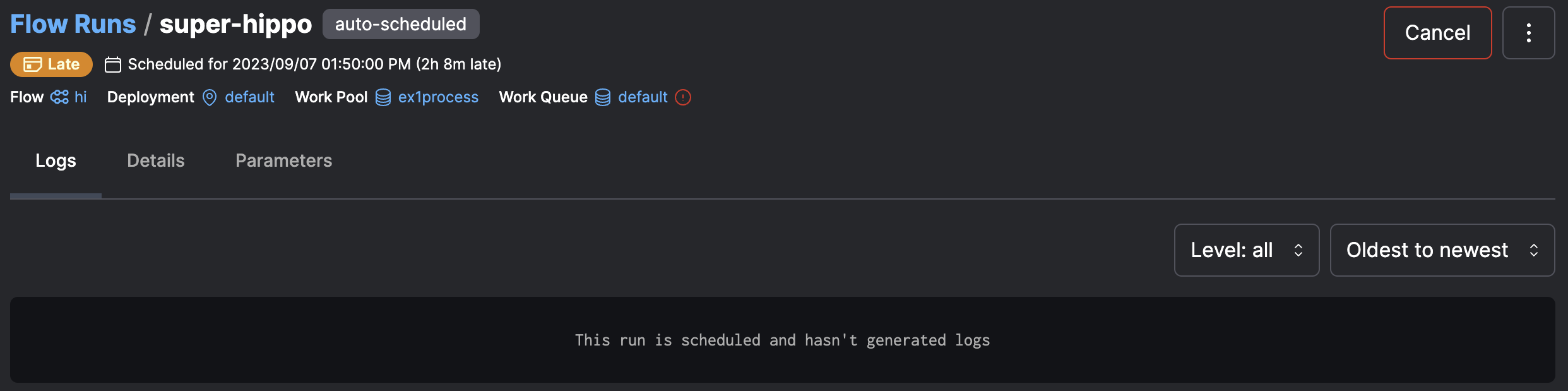
From the UI you can cancel a flow run by navigating to the flow run's detail page and clicking the `Cancel` button in the upper right corner.
## `log_prints=True`
- Print statements are now logged with INFO level `@flow(log_prints=True)`
```python
from prefect import task, flow
def business_logic():
print("custom sensitive data")
@task(log_prints=False)
def my_task():
print("print this only locally to the terminal")
business_logic()
@flow(log_prints=True)
def my_flow():
print("hello 👋")
my_task()
if __name__ == "__main__":
my_flow()
```
```python
from prefect import flow
@flow(log_prints=True)
def hi():
print("Hi from Prefect! 🤗")
if __name__ == "__main__":
hi()
```
The output from these prints will appear in the UI.

## **Capture prints from custom functions**
This feature will also capture prints made in functions *called* by tasks or flows. As long as you’re within the context of the run, the prints will be captured by the Prefect backend as logs.
```python
from prefect import task, flow
def business_logic():
print("custom non-Prefect code")
@task
def my_task():
print("world 🌍")
business_logic()
@flow(log_prints=True)
def my_flow():
print("hello 👋")
my_task()
if __name__ == "__main__":
my_flow()
```

## **Disable capturing logs for sensitive tasks**
If you have sensitive log messages, you can opt-out of logging the task-level `print()` statements, even if the **flow** decorator is configured with `log_prints=True`:
```python
from prefect import task, flow
def business_logic():
print("custom sensitive data")
@task(log_prints=False)
def my_task():
print("print this only locally to the terminal")
business_logic()
@flow(log_prints=True)
def my_flow():
print("hello 👋")
my_task()
if __name__ == "__main__":
my_flow()
```
This print statement will appear locally in the terminal:
```python
21:31:37.513 | INFO | prefect.engine - Created flow run 'gigantic-cockatoo' for flow 'my-flow'
21:31:37.593 | INFO | Flow run 'gigantic-cockatoo' - hello 👋
21:31:37.605 | INFO | Flow run 'gigantic-cockatoo' - Created task run 'my_task-20c6ece6-0' for task 'my_task'
21:31:37.606 | INFO | Flow run 'gigantic-cockatoo' - Executing 'my_task-20c6ece6-0' immediately...
print this only locally to the terminal
custom sensitive data
21:31:37.636 | INFO | Task run 'my_task-20c6ece6-0' - Finished in state Completed()
21:31:37.651 | INFO | Flow run 'gigantic-cockatoo' - Finished in state Completed('All states completed.')
```
…but won’t be sent to the Prefect logger or API:

See [the logging documentation](https://docs.prefect.io/concepts/logs/#logging-print-statements) and PR [#7580](https://github.com/PrefectHQ/prefect/pull/7580) for more details.
## Manual approval: `pause_flow_run` & `resume_flow_run` utilities
Starting from Prefect 2.7, flow runs can be **paused** and **resumed** after manual approval.
This release adds a new utility called `pause_flow_run`. When you call this utility from within a flow, Prefect will move the flow run to a `Paused` state and will block further execution. Any tasks that have begun execution *before pausing* will finish. Infrastructure will keep running and polling to check whether the flow run has been resumed. `Paused` flow runs can be resumed with the `resume_flow_run` utility or from the UI.
Additionally, you can provide a timeout to the `pause_flow_run` utility. This way, if the flow run is not resumed within the specified timeout, the flow will be marked as `Failed`.
## **Example: manual approval after evaluating the model quality**
Here is an example of how you can leverage that functionality to approve post-processing after manually validating the quality of a trained ML model:
```python
from prefect import task, flow, pause_flow_run
from prefect import get_run_logger
from prefect.context import get_run_context
from prefect.blocks.notifications import SlackWebhook
from prefect.settings import PREFECT_UI_URL
def get_ui_flowrun_url() -> str:
id_ = get_run_context().flow_run.dict().get('id')
ui_url = PREFECT_UI_URL.value() or "http://ephemeral-orion/api"
return f"{ui_url}/flow-runs/flow-run/{id_}"
def send_alert(message: str):
slack_webhook_block = SlackWebhook.load("default")
slack_webhook_block.notify(message)
@task
def run_initial_processing():
logger = get_run_logger()
logger.info("Processing something important 🤖")
logger.info("Calculating the answer to life, the universe, and everything...")
@task
def run_something_critical():
logger = get_run_logger()
logger.info("We'll reveal the answer to life, the universe, and everything!")
logger.info("The answer is... 42!")
@flow
def semi_manual_process(
process: str = "ChatGPT training",
) -> None:
logger = get_run_logger()
run_initial_processing()
url = get_ui_flowrun_url()
send_alert(f"{process} finished. Please approve to continue processing: {url}")
logger.info("Waiting for approval...")
pause_flow_run(timeout=600)
logger.info("Process got approved! 🎉 Moving on to the next task")
run_something_critical() # post-processing, ML training process, reporting on KPIs
if __name__ == "__main__":
semi_manual_process()
```
The UI will show a `Paused` state:

You can grab the flow run ID from the UI and run:
```python
from prefect import resume_flow_run
resume_flow_run("eca5860f-d94b-4be6-a0b4-6954af3bc6e8")
```
Once you run the above code or resume the execution from the UI, the run will continue:

## **Resuming execution from the UI**
This example sends a Slack notification when the process is ready for manual approval.

When you click on this link, you’ll see a friendly “Resume” button:

Once you click on it and confirm, the run will move again into a `Running` state:


And soon, it will reveal the answer to life, the universe, and everything!

This blocking style of pause that keeps infrastructure running is supported for all flow runs, including subflow runs. See [#7637](https://github.com/PrefectHQ/prefect/pull/7637) for more details.