1
2
3
4
5
6
7
8
9
10
11
12
13
14
15
16
17
18
19
20
21
22
23
24
25
26
27
28
29
30
31
32
33
34
35
36
37
38
39
40
41
42
43
44
45
46
47
48
49
50
51
52
53
54
55
56
57
58
59
60
61
62
63
64
65
66
67
68
69
70
71
72
73
74
75
76
77
78
79
80
81
82
83
84
85
86
87
88
89
90
91
92
93
94
95
96
97
98
99
100
101
102
103
104
105
106
107
108
109
110
111
112
113
114
115
116
117
118
119### Basic building blocks
In Prefect, [Python is the API](https://www.prefect.io/guide/blog/announcing-prefect-orion/). You can just write Python. But to organize the steps, control their execution state, and get more [visibility](https://medium.com/the-prefect-blog/scheduled-vs-event-driven-data-pipelines-orchestrate-anything-with-prefect-b915e6adc3ba), there are two core concepts that serve as an **entrypoint** to orchestration:
1. **`Task`**—an (optional) function that represents a discrete unit of work; since tasks are the smallest units already, [you can’t call tasks from other tasks](https://discourse.prefect.io/t/can-i-call-a-task-from-another-task/1453), but you can call subflows from any of your (*parent*) flows. And optionally, you can call a task functions using `task.fn()` but you would lose visibility
2. **`Flow`**— a container for business logic and orchestration rules for any executable/schedulable process.
You may combine `tasks`, `flows`, and subflows into composable and modular workflows in various ways depending on what you are trying to achieve.
---
### Returning data 📊, futures 🔮, and states ✔️
Prefect provides you with building blocks that you can flexibly apply to your workflows when you need them.
1. When getting started, you can run everything in a flow run process and return **data** directly.
2. When you need to take action based on a specific state change, you can leverage **`Prefect States`**.
3. When you want to move to concurrent or parallel execution, you can explore and start working with **`PrefectFutures`**.
Use as much of Prefect as needed by your workflows.
---
### When to return data 📊, futures 🔮 or states ✔️
Knowing the difference between returning data, states, and futures, let’s look at the common use cases in which you may prefer one over the other.
### When to return data 📊
When you return **data** directly, your Prefect tasks or flows work the same way as native Python functions. The benefit of that is the natural *pythonic* experience. The downside is that if your tasks or subflows fail, the exceptions are eagerly raised, and your workflow terminates immediately after the failure occurs.
This behavior is particularly useful for **sequential processing**, for instance, when you want to run some data transformations that must occur one after the other. If any previous one fails, you want the entire workflow to end immediately.
---
### **When to return a `Prefect Future`** 🔮
When you want to leverage Dask, Ray, or the async event loop, you can submit your tasks to a task runner and gain the benefits of *parallel* or *concurrent* execution. The same applies if you need more control for handling failure. **`PrefectFutures`** provide highly customizable orchestration functionality thanks to blocking task run submission calls, which work the same way locally as in a distributed setting (*e.g., when submitting work to a distributed Dask or Ray cluster*), even with asynchronous tasks and flows (*leveraging Python `async` libraries*).
---
### **When to return a `Prefect State`** ✔️
States become important if you want to take action based on a specific state transition. For instance, you may want to finish your flow run early if some API call didn’t return any data:
```python
from prefect import task, flow
from prefect.orion.schemas.states import Completed
@task
def extract_data_from_api():
return {"result": None}
@task
def process_data(data):
if isinstance(data["result"], dict):
pass # do some processing
@flow
def return_state_manually():
raw_data = extract_data_from_api()
if raw_data["result"] is None:
return Completed(message="No new data available, end the run early")
else:
process_data(raw_data)
if __name__ == "__main__":
return_state_manually()
```
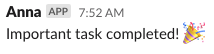
And here is an example showing how you can get notified via Slack when an important task finishes successfully:
```python
from prefect import task, flow
from prefect.blocks.notifications import SlackWebhook
def send_slack_alert(message: str):
slack_webhook_block = SlackWebhook.load("hq") # adjust to match your Block name
slack_webhook_block.notify(message)
@task
def always_succeeds_task():
return "I'm fail safe! ✅"
@flow
def flow_reacting_to_states():
state = always_succeeds_task(return_state=True)
if state.name == "Completed":
send_slack_alert("Important task completed! 🎉")
if __name__ == "__main__":
flow_reacting_to_states()
```
---
### Final state determination
Prefect determines the final state of your flow run based on the return value. Here is what it means in practice—if your flow returns:
- **Exception** = the run is marked as **Failed**; this happens any time an exception is raised in your task or flow function—either raised by you explicitly or raised unexpectedly 🔴
- **Data** = if your flow run returns some object representing data, and no failure interrupted this process, the run is marked as **Completed** ✅
- **State** = if you explicitly return a specific state, potentially based on some condition, Prefect will mark the flow run with this explicit state ✔️
- **None** = if neither **data** nor **state** is returned, then:1) as long as some task or flow failed, i.e. returned an **exception**, Prefect marks the run as **Failed** 🔴 2) if no exception was raised, the run is marked as **Completed** ✅.
For more final state determination examples, check out [the following documentation page](https://docs.prefect.io/concepts/flows/#final-state-determination).