1
2
3
4
5
6
7
8
9
10
11
12
13
14
15
16
17
18
19
20
21
22
23
24
25
26
27
28
29
30
31
32
33
34
35
36
37
38
39
40
41
42
43
44
45
46
47
48
49
50
51
52
53
54
55
56
57
58
59
60
61
62
63
64
65
66
67
68
69
70
71
72
73
74
75
76
77
78
79
80
81
82
83
84
85
86
87
88
89
90
91
92
93
94
95
96
97
98
99
100
101
102
103
104
105
106
107
108
109
110
111
112
113
114
115
116
117
118
119
120
121
122
123
124
125
126
127
128
129
130
131
132
133
134
135
136
137
138
139
140
141
142
143
144
145
146
147
148
149
150
151
152
153
154
155
156
157
158
159
160
161
162
163
164
165
166
167
168
169
170
171
172
173
174
175
176
177
178
179
180
181
182
183
184
185
186
187
188
189
190
191
192
193
194
195
196
197
198
199
200
201
202
203
204
205
206
207
208
209
210
211
212
213
214
215
216
217
218
219
220
221
222
223
224
225
226
227
228
229
230
231
232
233
234
235
236
237
238
239
240
241
242
243
244
245
246
247
248
249
250
251
252
253
254
255
256
257
258
259
260
261
262
263
264
265
266
267
268
269
270
271
272
273
274
275
276
277
278
279
280
281
282
283
284
285
286
287
288
289
290
291
292
293
294
295
296
297
298
299
300
301
302
303
304
305
306
307
308
309
310
311
312
313
314
315
316
317
318
319
320
321
322
323
324
325
326
327
328
329
330
331
332
333
334
335
336
337
338
339
340
341
342
343
344
345
346
347
348
349
350
351
352
353
354
355
356
357
358
359
360
361
362
363
364
365
366
367
368
369
370
371
372
373
374
375
376
377
378
379
380
381
382
383
384
385
386
387
388
389
390
391
392
393
394
395
396
397
398
399
400
401
402
403
404
405
406
407
408
409
410
411
412
413
414
415
416
417
418
419
420
421
422
423
424
425
426
427
428# Chronon: A Data Platform for AI/ML
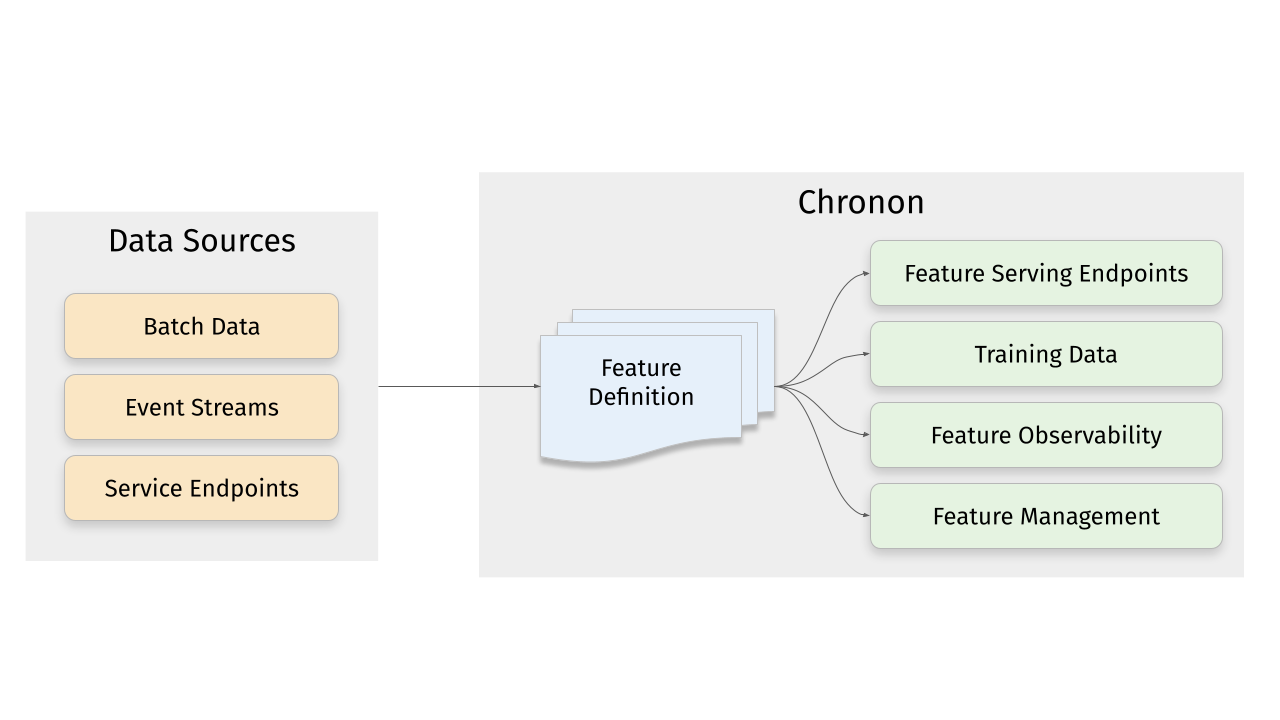
Chronon is a platform that abstracts away the complexity of data computation and serving for AI/ML applications. Users define features as transformation of raw data, then Chronon can perform batch and streaming computation, scalable backfills, low-latency serving, guaranteed correctness and consistency, as well as a host of observability and monitoring tools.
It allows you to utilize all of the data within your organization, from batch tables, event streams or services to power your AI/ML projects, without needing to worry about all the complex orchestration that this would usually entail.
More information about Chronon can be found at [chronon.ai](https://chronon.ai/).
## Platform Features
### Online Serving
Chronon offers an API for realtime fetching which returns up-to-date values for your features. It supports:
- Managed pipelines for batch and realtime feature computation and updates to the serving backend
- Low latency serving of computed features
- Scalable for high fanout feature sets
### Backfills
ML practitioners often need historical views of feature values for model training and evaluation. Chronon's backfills are:
- Scalable for large time windows
- Resilient to highly skewed data
- Point-in-time accurate such that consistency with online serving is guaranteed
### Observability, monitoring and data quality
Chronon offers visibility into:
- Data freshness - ensure that online values are being updated in realtime
- Online/Offline consistency - ensure that backfill data for model training and evaluation is consistent with what is being observed in online serving
### Complex transformations and windowed aggregations
Chronon supports a range of aggregation types. For a full list see the documentation [here](https://chronon.ai/Aggregations.html).
These aggregations can all be configured to be computed over arbitrary window sizes.
# Quickstart
This section walks you through the steps to create a training dataset with Chronon, using a fabricated underlying raw dataset.
Includes:
- Example implementation of the main API components for defining features - `GroupBy` and `Join`.
- The workflow for authoring these entities.
- The workflow for backfilling training data.
- The workflows for uploading and serving this data.
- The workflow for measuring consistency between backfilled training data and online inference data.
Does not include:
- A deep dive on the various concepts and terminologies in Chronon. For that, please see the [Introductory](https://chronon.ai/authoring_features/GroupBy.html) documentation.
- Running streaming jobs.
## Requirements
- Docker
## Setup
To get started with the Chronon, all you need to do is download the [docker-compose.yml](https://github.com/airbnb/chronon/blob/main/docker-compose.yml) file and run it locally:
```bash
curl -o docker-compose.yml https://chronon.ai/docker-compose.yml
docker-compose up
```
Once you see some data printed with a `only showing top 20 rows` notice, you're ready to proceed with the tutorial.
## Introduction
In this example, let's assume that we're a large online retailer, and we've detected a fraud vector based on users making purchases and later returning items. We want to train a model that will be called when the **checkout** flow commences and predicts whether this transaction is likely to result in a fraudulent return.
## Raw data sources
Fabricated raw data is included in the [data](https://github.com/airbnb/chronon/blob/main/api/py/test/sample/data) directory. It includes four tables:
1. Users - includes basic information about users such as account created date; modeled as a batch data source that updates daily
2. Purchases - a log of all purchases by users; modeled as a log table with a streaming (i.e. Kafka) event-bus counterpart
3. Returns - a log of all returns made by users; modeled as a log table with a streaming (i.e. Kafka) event-bus counterpart
4. Checkouts - a log of all checkout events; **this is the event that drives our model predictions**
### Start a shell session in the Docker container
In a new terminal window, run:
```shell
docker-compose exec main bash
```
This will open a shell within the chronon docker container.
## Chronon Development
Now that the setup steps are complete, we can start creating and testing various Chronon objects to define transformation and aggregations, and generate data.
### Step 1 - Define some features
Let's start with three feature sets, built on top of our raw input sources.
**Note: These python definitions are already in your `chronon` image. There's nothing for you to run until [Step 3 - Backfilling Data](#step-3---backfilling-data) when you'll run computation for these definitions.**
**Feature set 1: Purchases data features**
We can aggregate the purchases log data to the user level, to give us a view into this user's previous activity on our platform. Specifically, we can compute `SUM`s `COUNT`s and `AVERAGE`s of their previous purchase amounts over various windows.
Because this feature is built upon a source that includes both a table and a topic, its features can be computed in both batch and streaming.
```python
source = Source(
events=EventSource(
table="data.purchases", # This points to the log table with historical purchase events
topic=None, # Streaming is not currently part of quickstart, but this would be where you define the topic for realtime events
query=Query(
selects=select("user_id","purchase_price"), # Select the fields we care about
time_column="ts") # The event time
))
window_sizes = [Window(length=day, timeUnit=TimeUnit.DAYS) for day in [3, 14, 30]] # Define some window sizes to use below
v1 = GroupBy(
sources=[source],
keys=["user_id"], # We are aggregating by user
aggregations=[Aggregation(
input_column="purchase_price",
operation=Operation.SUM,
windows=window_sizes
), # The sum of purchases prices in various windows
Aggregation(
input_column="purchase_price",
operation=Operation.COUNT,
windows=window_sizes
), # The count of purchases in various windows
Aggregation(
input_column="purchase_price",
operation=Operation.AVERAGE,
windows=window_sizes
) # The average purchases by user in various windows
],
)
```
See the whole code file here: [purchases GroupBy](https://github.com/airbnb/chronon/blob/main/api/py/test/sample/group_bys/quickstart/purchases.py). This is also in your docker image. We'll be running computation for it and the other GroupBys in [Step 3 - Backfilling Data](#step-3---backfilling-data).
**Feature set 2: Returns data features**
We perform a similar set of aggregations on returns data in the [returns GroupBy](https://github.com/airbnb/chronon/blob/main/api/py/test/sample/group_bys/quickstart/returns.py). The code is not included here because it looks similar to the above example.
**Feature set 3: User data features**
Turning User data into features is a littler simpler, primarily because there are no aggregations to include. In this case, the primary key of the source data is the same as the primary key of the feature, so we're simply extracting column values rather than performing aggregations over rows:
```python
source = Source(
entities=EntitySource(
snapshotTable="data.users", # This points to a table that contains daily snapshots of the entire product catalog
query=Query(
selects=select("user_id","account_created_ds","email_verified"), # Select the fields we care about
)
))
v1 = GroupBy(
sources=[source],
keys=["user_id"], # Primary key is the same as the primary key for the source table
aggregations=None # In this case, there are no aggregations or windows to define
)
```
Taken from the [users GroupBy](https://github.com/airbnb/chronon/blob/main/api/py/test/sample/group_bys/quickstart/users.py).
### Step 2 - Join the features together
Next, we need the features that we previously defined backfilled in a single table for model training. This can be achieved using the `Join` API.
For our use case, it's very important that features are computed as of the correct timestamp. Because our model runs when the checkout flow begins, we'll want to be sure to use the corresponding timestamp in our backfill, such that features values for model training logically match what the model will see in online inference.
`Join` is the API that drives feature backfills for training data. It primarilly performs the following functions:
1. Combines many features together into a wide view (hence the name `Join`).
2. Defines the primary keys and timestamps for which feature backfills should be performed. Chronon can then guarantee that feature values are correct as of this timestamp.
3. Performs scalable backfills.
Here is what our join looks like:
```python
source = Source(
events=EventSource(
table="data.checkouts",
query=Query(
selects=select("user_id"), # The primary key used to join various GroupBys together
time_column="ts",
) # The event time used to compute feature values as-of
))
v1 = Join(
left=source,
right_parts=[JoinPart(group_by=group_by) for group_by in [purchases_v1, refunds_v1, users]] # Include the three GroupBys
)
```
Taken from the [training_set Join](https://github.com/airbnb/chronon/blob/main/api/py/test/sample/joins/quickstart/training_set.py).
The `left` side of the join is what defines the timestamps and primary keys for the backfill (notice that it is built on top of the `checkout` event, as dictated by our use case).
Note that this `Join` combines the above three `GroupBy`s into one data definition. In the next step, we'll run the command to execute computation for this whole pipeline.
### Step 3 - Backfilling Data
Once the join is defined, we compile it using this command:
```shell
compile.py --conf=joins/quickstart/training_set.py
```
This converts it into a thrift definition that we can submit to spark with the following command:
```shell
run.py --conf production/joins/quickstart/training_set.v1
```
The output of the backfill would contain the user_id and ts columns from the left source, as well as the 11 feature columns from the three GroupBys that we created.
Feature values would be computed for each user_id and ts on the left side, with guaranteed temporal accuracy. So, for example, if one of the rows on the left was for `user_id = 123` and `ts = 2023-10-01 10:11:23.195`, then the `purchase_price_avg_30d` feature would be computed for that user with a precise 30 day window ending on that timestamp.
You can now query the backfilled data using the spark sql shell:
```shell
spark-sql
```
And then:
```sql
spark-sql> SELECT user_id, quickstart_returns_v1_refund_amt_sum_30d, quickstart_purchases_v1_purchase_price_sum_14d, quickstart_users_v1_email_verified from default.quickstart_training_set_v1 limit 100;
```
Note that this only selects a few columns. You can also run a `select * from default.quickstart_training_set_v1 limit 100;` to see all columns, however, note that the table is quite wide and the results might not be very readable on your screen.
To exit the sql shell you can run:
```shell
spark-sql> quit;
```
## Online Flows
Now that we've created a join and backfilled data, the next step would be to train a model. That is not part of this tutorial, but assuming it was complete, the next step after that would be to productionize the model online. To do this, we need to be able to fetch feature vectors for model inference. That's what this next section covers.
### Uploading data
In order to serve online flows, we first need the data uploaded to the online KV store. This is different than the backfill that we ran in the previous step in two ways:
1. The data is not a historic backfill, but rather the most up-to-date feature values for each primary key.
2. The datastore is a transactional KV store suitable for point lookups. We use MongoDB in the docker image, however you are free to integrate with a database of your choice.
Upload the purchases GroupBy:
```shell
run.py --mode upload --conf production/group_bys/quickstart/purchases.v1 --ds 2023-12-01
spark-submit --class ai.chronon.quickstart.online.Spark2MongoLoader --master local[*] /srv/onlineImpl/target/scala-2.12/mongo-online-impl-assembly-0.1.0-SNAPSHOT.jar default.quickstart_purchases_v1_upload mongodb://admin:admin@mongodb:27017/?authSource=admin
```
Upload the returns GroupBy:
```shell
run.py --mode upload --conf production/group_bys/quickstart/returns.v1 --ds 2023-12-01
spark-submit --class ai.chronon.quickstart.online.Spark2MongoLoader --master local[*] /srv/onlineImpl/target/scala-2.12/mongo-online-impl-assembly-0.1.0-SNAPSHOT.jar default.quickstart_returns_v1_upload mongodb://admin:admin@mongodb:27017/?authSource=admin
```
### Upload Join Metadata
If we want to use the `FetchJoin` api rather than `FetchGroupby`, then we also need to upload the join metadata:
```bash
run.py --mode metadata-upload --conf production/joins/quickstart/training_set.v2
```
This makes it so that the online fetcher knows how to take a request for this join and break it up into individual GroupBy requests, returning the unified vector, similar to how the Join backfill produces the wide view table with all features.
### Fetching Data
With the above entities defined, you can now easily fetch feature vectors with a simple API call.
Fetching a join:
```bash
run.py --mode fetch --type join --name quickstart/training_set.v2 -k '{"user_id":"5"}'
```
You can also fetch a single GroupBy (this would not require the Join metadata upload step performed earlier):
```bash
run.py --mode fetch --type group-by --name quickstart/purchases.v1 -k '{"user_id":"5"}'
```
For production, the Java client is usually embedded directly into services.
```Java
Map<String, String> keyMap = new HashMap<>();
keyMap.put("user_id", "123");
Fetcher.fetch_join(new Request("quickstart/training_set_v1", keyMap))
```
sample response
```
> '{"purchase_price_avg_3d":14.3241, "purchase_price_avg_14d":11.89352, ...}'
```
**Note: This java code is not runnable in the docker env, it is just an illustrative example.**
## Log fetches and measure online/offline consistency
As discussed in the introductory sections of this [README](https://github.com/airbnb/chronon?tab=readme-ov-file#platform-features), one of Chronon's core guarantees is online/offline consistency. This means that the data that you use to train your model (offline) matches the data that the model sees for production inference (online).
A key element of this is temporal accuracy. This can be phrased as: **when backfilling features, the value that is produced for any given `timestamp` provided by the left side of the join should be the same as what would have been returned online if that feature was fetched at that particular `timestamp`**.
Chronon not only guarantees this temporal accuracy, but also offers a way to measure it.
The measurement pipeline starts with the logs of the online fetch requests. These logs include the primary keys and timestamp of the request, along with the fetched feature values. Chronon then passes the keys and timestamps to a Join backfill as the left side, asking the compute engine to backfill the feature values. It then compares the backfilled values to actual fetched values to measure consistency.
Step 1: log fetches
First, make sure you've ran a few fetch requests. Run:
`run.py --mode fetch --type join --name quickstart/training_set.v2 -k '{"user_id":"5"}'`
A few times to generate some fetches.
With that complete, you can run this to create a usable log table (these commands produce a logging hive table with the correct schema):
```bash
spark-submit --class ai.chronon.quickstart.online.MongoLoggingDumper --master local[*] /srv/onlineImpl/target/scala-2.12/mongo-online-impl-assembly-0.1.0-SNAPSHOT.jar default.chronon_log_table mongodb://admin:admin@mongodb:27017/?authSource=admin
compile.py --conf group_bys/quickstart/schema.py
run.py --mode backfill --conf production/group_bys/quickstart/schema.v1
run.py --mode log-flattener --conf production/joins/quickstart/training_set.v2 --log-table default.chronon_log_table --schema-table default.quickstart_schema_v1
```
This creates a `default.quickstart_training_set_v2_logged` table that contains the results of each of the fetch requests that you previously made, along with the timestamp at which you made them and the `user` that you requested.
**Note:** Once you run the above command, it will create and "close" the log partitions, meaning that if you make additional fetches on the same day (UTC time) it will not append. If you want to go back and generate more requests for online/offline consistency, you can drop the table (run `DROP TABLE default.quickstart_training_set_v2_logged` in a `spark-sql` shell) before rerunning the above command.
Now you can compute consistency metrics with this command:
```bash
run.py --mode consistency-metrics-compute --conf production/joins/quickstart/training_set.v2
```
This job will take the primary key(s) and timestamps from the log table (`default.quickstart_training_set_v2_logged` in this case), and uses those to create and run a join backfill. It then compares the backfilled results to the actual logged values that were fetched online
It produces two output tables:
1. `default.quickstart_training_set_v2_consistency`: A human readable table that you can query to see the results of the consistency checks.
1. You can enter a sql shell by running `spark-sql` from your docker bash sesion, then query the table.
2. Note that it has many columns (multiple metrics per feature), so you might want to run a `DESC default.quickstart_training_set_v2_consistency` first, then select a few columns that you care about to query.
2. `default.quickstart_training_set_v2_consistency_upload`: A list of KV bytes that is uploaded to the online KV store, that can be used to power online data quality monitoring flows. Not meant to be human readable.
## Conclusion
Using chronon for your feature engineering work simplifies and improves your ML Workflow in a number of ways:
1. You can define features in one place, and use those definitions both for training data backfills and for online serving.
2. Backfills are automatically point-in-time correct, which avoids label leakage and inconsistencies between training data and online inference.
3. Orchestration for batch and streaming pipelines to keep features up to date is made simple.
4. Chronon exposes easy endpoints for feature fetching.
5. Consistency is guaranteed and measurable.
For a more detailed view into the benefits of using Chronon, see [Benefits of Chronon documentation](https://github.com/airbnb/chronon/tree/main?tab=readme-ov-file#benefits-of-chronon-over-other-approaches).
# Benefits of Chronon over other approaches
Chronon offers the most value to AI/ML practitioners who are trying to build "online" models that are serving requests in real-time as opposed to batch workflows.
Without Chronon, engineers working on these projects need to figure out how to get data to their models for training/eval as well as production inference. As the complexity of data going into these models increases (multiple sources, complex transformation such as windowed aggregations, etc), so does the infrastructure challenge of supporting this data plumbing.
Generally, we observed ML practitioners taking one of two approaches:
## The log-and-wait approach
With this approach, users start with the data that is available in the online serving environment from which the model inference will run. Log relevant features to the data warehouse. Once enough data has accumulated, train the model on the logs, and serve with the same data.
Pros:
- Features used to train the model are guaranteed to be available at serving time
- The model can access service call features
- The model can access data from the the request context
Cons:
- It might take a long to accumulate enough data to train the model
- Performing windowed aggregations is not always possible (running large range queries against production databases doesn't scale, same for event streams)
- Cannot utilize the wealth of data already in the data warehouse
- Maintaining data transformation logic in the application layer is messy
## The replicate offline-online approach
With this approach, users train the model with data from the data warehouse, then figure out ways to replicate those features in the online environment.
Pros:
- You can use a broad set of data for training
- The data warehouse is well suited for large aggregations and other computationally intensive transformation
Cons:
- Often very error prone, resulting in inconsistent data between training and serving
- Requires maintaining a lot of complicated infrastructure to even get started with this approach,
- Serving features with realtime updates gets even more complicated, especially with large windowed aggregations
- Unlikely to scale well to many models
**The Chronon approach**
With Chronon you can use any data available in your organization, including everything in the data warehouse, any streaming source, service calls, etc, with guaranteed consistency between online and offline environments. It abstracts away the infrastructure complexity of orchestrating and maintining this data plumbing, so that users can simply define features in a simple API, and trust Chronon to handle the rest.
# Contributing
We welcome contributions to the Chronon project! Please read [CONTRIBUTING](CONTRIBUTING.md) for details.
# Support
Use the GitHub issue tracker for reporting bugs or feature requests.
Join our [community Slack workspace](https://join.slack.com/t/chrononworkspace/shared_invite/zt-2r621b6hw-pm552u71Y257Vtpt4RTiyg) for discussions, tips, and support.