1
2
3
4
5
6
7
8
9
10
11
12
13
14
15
16
17
18
19
20
21
22
23
24
25
26
27
28
29
30
31
32
33
34
35
36
37
38
39
40
41
42
43
44
45
46
47
48
49
50
51
52
53
54
55
56
57
58
59
60
61
62
63
64
65
66
67
68
69
70
71
72
73
74
75NanoCanvas {#mainpage}
---
NanoCanvas is the HTML5 Canvas liked antialiased vector graphics rendering library writing in C++11 based on [Mikko Mononen's NanoVG](https://github.com/memononen/nanovg) .
## Feartures
* Easy to use , with HTML5 Canvas liked API
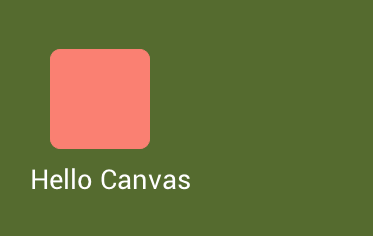
```c++
canvas.clearColor(Colors::DarkOliveGreen); //Clear canvas with color
// Draw a rounded rectangle
canvas.beginPath()
.roundedRect(50,50,100,100,10)
.fillStyle(Colors::Salmon)
.fill();
// Draw styled text
TextStyle textStyle;
textStyle.size = 36.0f;
textStyle.color = Colors::White;
textStyle.face = font.face;
canvas.fillStyle(textStyle)
.beginPath()
.fillText("Hello Canvas",30,190);
```
* Hardware accelerated so it's fast
Thanks for backend ports of NanoVG , now we can use NanoCanvas with OpenGL, OpenGL ES, [BGFX](https://github.com/bkaradzic/bgfx) and [D3D](https://github.com/cmaughan/nanovg).
## Integrate to your projects
1. Add NanoVG code to your projects and add the folder where your nanovg.h file located to your include directory. Be sure `#included "nanovg.h"` works on your projects.
2. Add NanoCanvas code files under `src` folder in to your projects.
3. Create Canvas with NanoVG context
For example,using OpenGL 3.x as the backend renderer.
```c++
NVGcontext * nvgCtx = nvgCreateGL3(NVG_ANTIALIAS | NVG_DEBUG |NVG_STENCIL_STROKES);
Canvas canvas(nvgCtx,wndWidth ,wndHeight);
if(canvas.valid()) {
// Everything is OK
}
```
4 . Draw awesome graphics
Draw graphics between `begineFrame()` and `endFrame` method.
```c++
// main render loop
while ( appRunning )
{
canvas.begineFrame(wndWidth,wndHeight);
// Draw awesome graphics here
canvas.endFrame();
}
```
### Why not takes NanoVG itself ?
You can use the backend renderer as your like. You have to do that by yourself. :)
---
## For more informations
### [Documemtations](https://geequlim.github.io/NanoCanvas/doc/html/index.html) is avaliable.