1
2
3
4
5
6
7
8
9
10
11
12
13
14
15
16
17
18
19
20
21
22
23
24
25
26
27
28
29
30
31
32
33
34
35
36
37
38
39
40
41
42
43
44
45
46
47
48
49
50
51
52
53
54
55
56
57
58
59
60
61
62
63
64
65
66
67
68
69
70
71
72
73
74
75
76
77
78
79
80
81
82
83
84
85
86
87
88
89
90
91
92
93
94
95
96
97
98
99
100
101
102
103
104
105
106
107
108
109
110
111
112
113
114
115
116
117
118
119
120
121
122
123
124
125
126
127
128
129
130
131
132
133
134
135
136
137
138
139
140
141
142
143
144
145
146
147
148
149
150
151
152
153
154
155
156
157
158
159
160
161
162
163
164
165
166
167
168
169
170
171
172
173
174
175
176
177
178
179
180
181
182
183
184
185
186
187
188
189
190
191
192
193
194<!-- markdownlint-disable MD030 -->
<img width="100%" src="https://github.com/FlowiseAI/Flowise/blob/main/images/flowise.png?raw=true"></a>
# Flowise - Build LLM Apps Easily
[](https://github.com/FlowiseAI/Flowise/releases)
[](https://discord.gg/jbaHfsRVBW)
[](https://twitter.com/FlowiseAI)
[](https://star-history.com/#FlowiseAI/Flowise)
[](https://github.com/FlowiseAI/Flowise/fork)
English | [中文](./README-ZH.md)
<h3>Drag & drop UI to build your customized LLM flow</h3>
<a href="https://github.com/FlowiseAI/Flowise">
<img width="100%" src="https://github.com/FlowiseAI/Flowise/blob/main/images/flowise.gif?raw=true"></a>
## ⚡Quick Start
Download and Install [NodeJS](https://nodejs.org/en/download) >= 18.15.0
1. Install Flowise
```bash
npm install -g flowise
```
2. Start Flowise
```bash
npx flowise start
```
With username & password
```bash
npx flowise start --FLOWISE_USERNAME=user --FLOWISE_PASSWORD=1234
```
3. Open [http://localhost:3000](http://localhost:3000)
## 🐳 Docker
### Docker Compose
1. Go to `docker` folder at the root of the project
2. Copy `.env.example` file, paste it into the same location, and rename to `.env`
3. `docker-compose up -d`
4. Open [http://localhost:3000](http://localhost:3000)
5. You can bring the containers down by `docker-compose stop`
### Docker Image
1. Build the image locally:
```bash
docker build --no-cache -t flowise .
```
2. Run image:
```bash
docker run -d --name flowise -p 3000:3000 flowise
```
3. Stop image:
```bash
docker stop flowise
```
## 👨💻 Developers
Flowise has 3 different modules in a single mono repository.
- `server`: Node backend to serve API logics
- `ui`: React frontend
- `components`: Langchain components
### Prerequisite
- Install [Yarn v1](https://classic.yarnpkg.com/en/docs/install)
```bash
npm i -g yarn
```
### Setup
1. Clone the repository
```bash
git clone https://github.com/FlowiseAI/Flowise.git
```
2. Go into repository folder
```bash
cd Flowise
```
3. Install all dependencies of all modules:
```bash
yarn install
```
4. Build all the code:
```bash
yarn build
```
5. Start the app:
```bash
yarn start
```
You can now access the app on [http://localhost:3000](http://localhost:3000)
6. For development build:
- Create `.env` file and specify the `PORT` (refer to `.env.example`) in `packages/ui`
- Create `.env` file and specify the `PORT` (refer to `.env.example`) in `packages/server`
- Run
```bash
yarn dev
```
Any code changes will reload the app automatically on [http://localhost:8080](http://localhost:8080)
## 🔒 Authentication
To enable app level authentication, add `FLOWISE_USERNAME` and `FLOWISE_PASSWORD` to the `.env` file in `packages/server`:
```
FLOWISE_USERNAME=user
FLOWISE_PASSWORD=1234
```
## 🌱 Env Variables
Flowise support different environment variables to configure your instance. You can specify the following variables in the `.env` file inside `packages/server` folder. Read [more](https://github.com/FlowiseAI/Flowise/blob/main/CONTRIBUTING.md#-env-variables)
## 📖 Documentation
[Flowise Docs](https://docs.flowiseai.com/)
## 🌐 Self Host
### [Railway](https://docs.flowiseai.com/deployment/railway)
[](https://railway.app/template/pn4G8S?referralCode=WVNPD9)
### [Render](https://docs.flowiseai.com/deployment/render)
[](https://docs.flowiseai.com/deployment/render)
### [Elestio](https://elest.io/open-source/flowiseai)
[](https://elest.io/open-source/flowiseai)
### [HuggingFace Spaces](https://docs.flowiseai.com/deployment/hugging-face)
<a href="https://huggingface.co/spaces/FlowiseAI/Flowise"><img src="https://huggingface.co/datasets/huggingface/badges/raw/main/open-in-hf-spaces-sm.svg" alt="HuggingFace Spaces"></a>
### [AWS](https://docs.flowiseai.com/deployment/aws)
### [Azure](https://docs.flowiseai.com/deployment/azure)
### [DigitalOcean](https://docs.flowiseai.com/deployment/digital-ocean)
### [GCP](https://docs.flowiseai.com/deployment/gcp)
## 💻 Cloud Hosted
Coming soon
## 🙋 Support
Feel free to ask any questions, raise problems, and request new features in [discussion](https://github.com/FlowiseAI/Flowise/discussions)
## 🙌 Contributing
Thanks go to these awesome contributors
<a href="https://github.com/FlowiseAI/Flowise/graphs/contributors">
<img src="https://contrib.rocks/image?repo=FlowiseAI/Flowise" />
</a>
See [contributing guide](CONTRIBUTING.md). Reach out to us at [Discord](https://discord.gg/jbaHfsRVBW) if you have any questions or issues.
[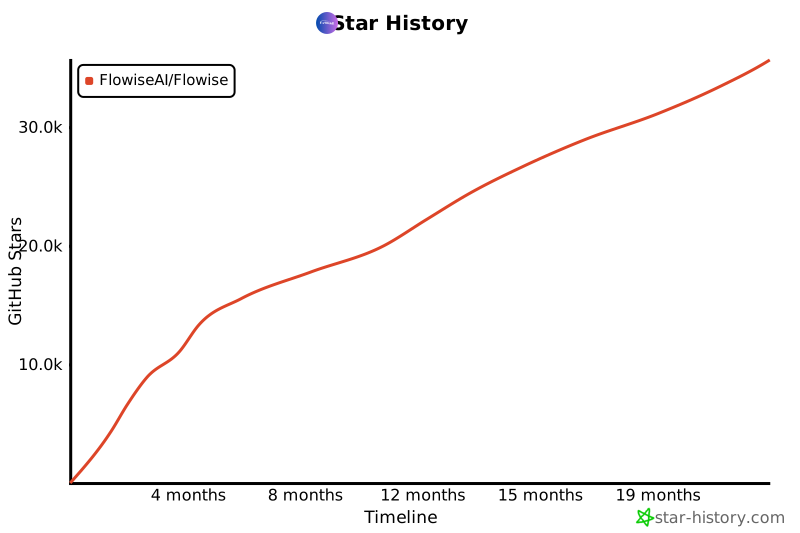](https://star-history.com/#FlowiseAI/Flowise&Date)
## 📄 License
Source code in this repository is made available under the [Apache License Version 2.0](LICENSE.md).