BurntSushi / erd
Translates a plain text description of a relational database schema to a graphical entity-relationship diagram.
📥 Clone
https://github.com/BurntSushi/erd.git



This utility takes a plain text description of entities, their attributes and
the relationships between entities and produces a visual diagram modeling the
description. The visualization is produced by using Dot with GraphViz. There
are limited options for specifying color and font information. Also, erd can
output graphs in a variety of formats, including but not limited to: pdf, svg,
eps, png, jpg, plain text and dot.
Here's an example of the output produced by erd (click on it for a larger PDF
version):
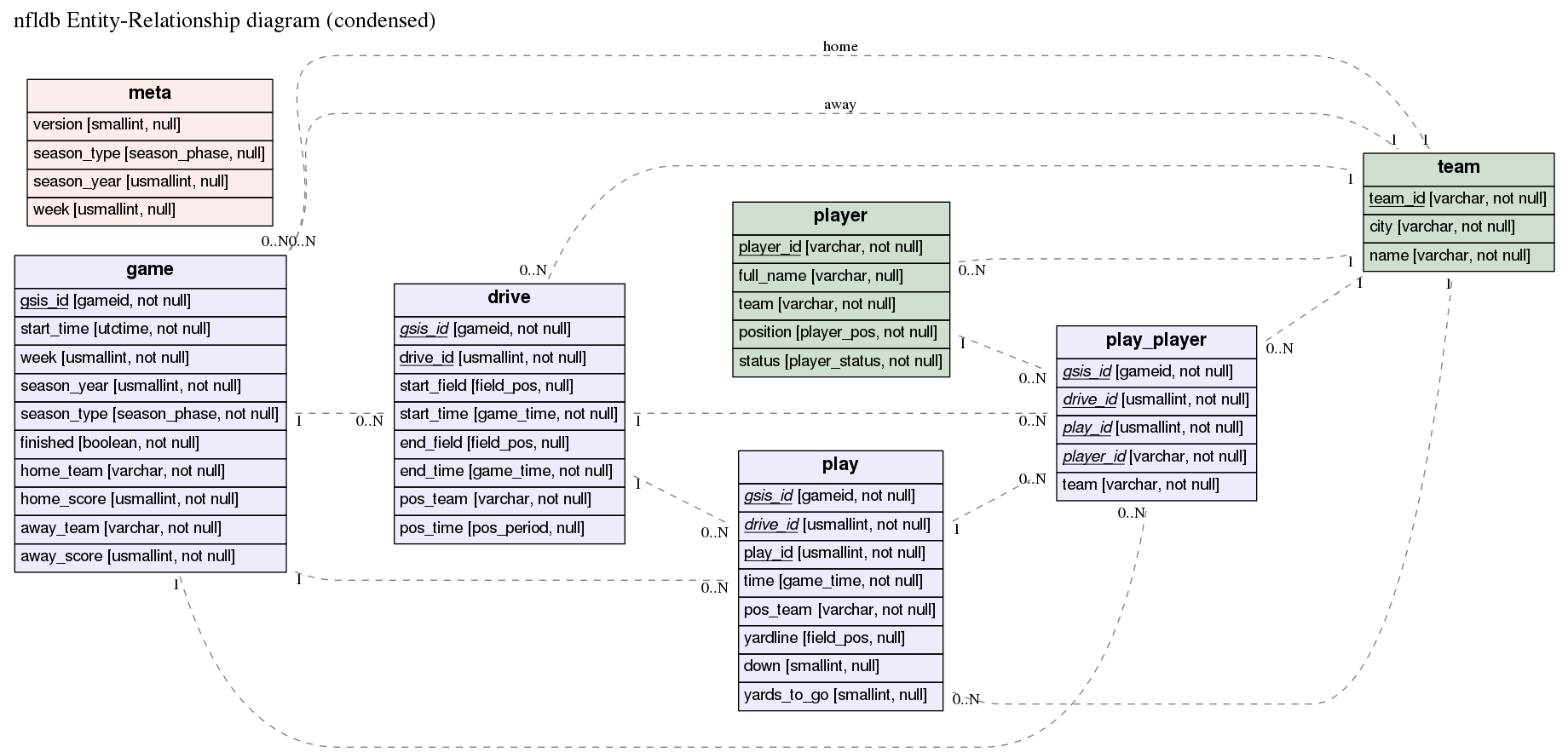
The corresponding er file is in the examples
directory.
Installation
erd requires GraphViz, and one of:
Docker
An example command to use erd in a docker container, once this repository is successfully cloned.
erdtag="0.2.1.0"; cd erd && docker build -t erd:$erdtag . && docker run -it erd:$erdtag "--help"- you shall specify your erdtag, that will help identifying the docker image to be created;
- instead of using
--helpinvoke erd the way you need to i.e.:
docker run -i erd:$erdtag "--dot-entity" < examples/nfldb.er > out.pdfStack
Install the Stack build tool, and build from source:
git clone git://github.com/BurntSushi/erd cd erd stack install
stack install will put the binary into Stack's standard binary
installation path. Unless you've overridden it, that's ~/.local/bin
on Unix and OS X, %APPDATA%\local\bin on Windows.
Haskell Platform
NB OSX users: for text formatting of keys (bold and italics) you may need to reinstallgraphvizwithpangosupport:
# OSX only
brew install graphviz
The issue 1636 explains what needs to be performed in details to find out whether pango support is enabled and how to make it happen in case it wasn't.
erd is on hackage, so you can install it with cabal (which is included with the Haskell platform):
cabal new-install erd
Alternatively, you can clone this repository and build from source:
git clone git://github.com/BurntSushi/erd cd erd cabal new-configure cabal new-build # binary is now under ./dist-newstyle/build/
Usage information is available with erd --help.
Building statically linked executable
In case one wishes to have a statically linked erd as a result, this is
possible to have by executing build-static_by-nix.sh: which requires the
nix package manager to be installed on the building
machine. NixOS itself is not a requirement.
Quick example
Before describing the ER file, let's try making an ER diagram from a small example:
$ curl 'https://raw.githubusercontent.com/BurntSushi/erd/master/examples/simple.er' > simple.er
$ cat simple.er
# Entities are declared in '[' ... ']'. All attributes after the entity header
# up until the end of the file (or the next entity declaration) correspond
# to this entity.
[Person]
*name
height
weight
`birth date`
+birth_place_id

[`Birth Place`]
*id
`birth city`
'birth state'
"birth country"

# Each relationship must be between exactly two entities, which need not
# be distinct. Each entity in the relationship has exactly one of four
# possible cardinalities:
#
# Cardinality    Syntax
# 0 or 1         ?
# exactly 1      1
# 0 or more      *
# 1 or more      +
Person *--1 `Birth Place`
$ erd -i simple.er -o simple.pdf
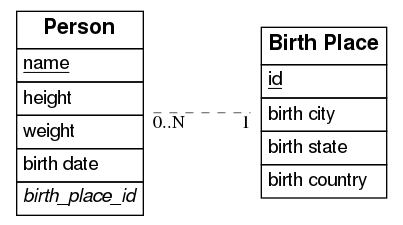
The PDF should now contain a graph that looks like this:
Available command-line options
| Short | Long | Description |
|---|---|---|
| -c[FILE] | --config[=FILE] | Configuration file. |
| -i FILE | --input=FILE | When set, input will be read from the given file. Otherwise, stdin will be used. |
| -o FILE | --output=FILE | When set, output will be written to the given file. Otherwise, stdout will be used. If given and if --fmt is omitted, then the format will be guessed from the file extension. |
| -f FMT | --fmt=FMT | Force the output format to one of: bmp, dot, eps, gif, jpg, pdf, plain, png, ps, ps2, svg, tiff. |
| -e EDGE | --edge=EDGE | Select one type of edge: compound, noedge, ortho, poly, spline. |
| -d | --dot-entity | When set, output will consist of regular dot tables instead of HTML tables. Formatting will be disabled. |
| -h | --help | Show this usage message. |
Formatting defined in configuration file
erd may be invoked using the -c or --config argument
- without a provided configuration file it will try to read the file
erd will print the default content of this file to stdout which you can
inspect and/or redirect appropriately, e.g.: ``erd -c -i ./examples/nfldb.er
-o ./nfldb.pdf 1 > ~/.erd.yaml` .
- with a provided configuration file erd will use that instead of _~/.erd.yaml_.
For instance: `erd -c./myconfig.yaml -i ./examples/nfldb.er -o ./nfldb.pdf%%CODEBLOCK4%%
[Person]
%%CODEBLOCK5%%
[Person]
name
height
%%CODEBLOCK6%%
[Birth Place]
*id
birth city
'birth state'
"birth country"
%%CODEBLOCK7%%
[Person]
*name
+birth_place_id
%%CODEBLOCK8%%
Cardinality    Syntax
0 or 1         ?
exactly 1      1
0 or more      *
1 or more      +
%%CODEBLOCK9%%
Person *--1
Birth Place
%%CODEBLOCK10%%
Artist +--? PlatinumAlbums
%%CODEBLOCK11%%
[Person] {bgcolor: "#ececfc", size: "20"}
name
height
weight
%%CODEBLOCK12%%
entity {bgcolor: "#ececfc", size: "20"}

[Person]
name
height
weight

[
Birth Place]
place
%%CODEBLOCK13%%
title {label: "nfldb Entity-Relationship diagram (condensed)", size: "20"}
# Entities
[player] {bgcolor: "#d0e0d0"}
*player_id {label: "varchar, not null"}
full_name {label: "varchar, null"}
team {label: "varchar, not null"}
position {label: "player_pos, not null"}
status {label: "player_status, not null"}
[team] {bgcolor: "#d0e0d0"}
*team_id {label: "varchar, not null"}
city {label: "varchar, not null"}
name {label: "varchar, not null"}
[game] {bgcolor: "#ececfc"}
*gsis_id {label: "gameid, not null"}
start_time {label: "utctime, not null"}
week {label: "usmallint, not null"}
season_year {label: "usmallint, not null"}
season_type {label: "season_phase, not null"}
finished {label: "boolean, not null"}
home_team {label: "varchar, not null"}
home_score {label: "usmallint, not null"}
away_team {label: "varchar, not null"}
away_score {label: "usmallint, not null"}
[drive] {bgcolor: "#ececfc"}
*+gsis_id {label: "gameid, not null"}
*drive_id {label: "usmallint, not null"}
start_field {label: "field_pos, null"}
start_time {label: "game_time, not null"}
end_field {label: "field_pos, null"}
end_time {label: "game_time, not null"}
pos_team {label: "varchar, not null"}
pos_time {label: "pos_period, null"}
[play] {bgcolor: "#ececfc"}
*+gsis_id {label: "gameid, not null"}
*+drive_id {label: "usmallint, not null"}
*play_id {label: "usmallint, not null"}
time {label: "game_time, not null"}
pos_team {label: "varchar, not null"}
yardline {label: "field_pos, null"}
down {label: "smallint, null"}
yards_to_go {label: "smallint, null"}
[play_player] {bgcolor: "#ececfc"}
*+gsis_id {label: "gameid, not null"}
*+drive_id {label: "usmallint, not null"}
*+play_id {label: "usmallint, not null"}
*+player_id {label: "varchar, not null"}
team {label: "varchar, not null"}
[meta] {bgcolor: "#fcecec"}
version {label: "smallint, null"}
season_type {label: "season_phase, null"}
season_year {label: "usmallint, null"}
week {label: "usmallint, null"}
# Relationships
player *--1 team
game *--1 team {label: "home"}
game *--1 team {label: "away"}
drive *--1 team
play *--1 team
play_player *--1 team
game 1--* drive
game 1--* play
game 1--* play_player
drive 1--* play
drive 1--* play_player
play 1--* play_player
player 1--* play_player
%%CODEBLOCK14%%
[Person]
name {
label: "string",
color: "#3366ff", # i like bright blue
}
weight {
label: "int",}
`
### Philosophy

I don't intend for
erd to have a large feature set with a lot of options for
customizing the appearance of ER diagrams. erd should produce diagrams that
are "good enough" from simple plain text descriptions without a lot of
complexity. erd will implicitly trust GraphViz to "do the right thing"
without a lot of fiddling with its options.
If you have more exotic needs, then I suggest that either erd is not the
right tool, *or* you could use erd to output an er file as a dot file.
You can then customize it further manually or using some other tool.
You can output a dot file using the --fmt option or by simply using it as
a file extension:
erd -i something.er -o something.dot
### Similar software
Surprisingly, the only other software I'm aware of that translates a plain text
description of a relational schema to a graphical visualization is
[erwiz](https://github.com/slopjong/Erwiz). The project appears to be
abandoned.
If you've used erwiz before, you'll notice that the format of the er file
is inspired by it. The er` format is a bit more lightweight, but its general
structure is similar.