1
2
3
4
5
6
7
8
9
10
11
12
13
14
15
16
17
18
19
20
21
22
23
24
25
26
27
28
29
30
31
32
33
34
35
36
37
38
39
40
41
42
43
44
45
46
47
48
49
50
51
52
53
54
55
56
57
58
59
60
61
62
63
64
65
66
67
68
69
70
71
72
73
74
75
76
77
78
79
80
81
82
83
84
85
86
87
88
89
90
91
92
93
94
95
96
97
98
99
100
101
102
103
104
105
106
107
108
109
110
111
112
113
114
115
116
117
118
119
120
121
122
123
124
125
126
127
128
129
130
131
132
133
134
135
136
137
138
139
140
141
142
143
144
145
146
147
148
149
150
151
152
153
154
155
156
157
158
159
160
161
162
163
164
165
166
167
168
169
170
171
172
173
174
175
176
177
178
179
180
181
182
183
184
185
186
187
188
189
190
191
192
193
194
195
196
197
198
199
200
201
202
203
204
205
206
207
208
209
210
211
212
213
214
215
216
217
218
219
220
221
222
223
224
225
226
227
228
229
230
231
232
233
234
235
236
237
238
239
240
241
242
243
244
245
246
247
248
249
250
251
252
253
254
255
256
257
258
259
260
261
262
263
264
265
266
267
268
269
270
271
272
273
274
275
276
277
278
279
280
281
282
283
284
285
286
287
288
289
290
291
292
293
294
295
296
297
298
299
300
301
302
303
304
305
306
307
308
309
310
311
312
313
314
315
316
317
318
319
320
321
322
323
324
325
326
327
328
329
330
331
332
333
334
335
336
337
338
339
340
341
342
343
344
345
346
347
348
349
350
351
352
353
354
355
356
357
358
359
360
361
362
363
364
365
366
367
368
369
370
371
372
373
374
375
376
377
378
379
380
381
382
383
384
385
386
387
388
389
390
391
392
393
394
395
396
397
398
399
400
401
402
403
404
405
406
407
408
409
410
411
412
413
414
415
416
417
418
419
420
421
422
423
424
425
426
427
428
429
430
431
432
433
434
435
436
437
438
439
440
441
442
443
444
445
446
447
448
449
450
451
452
453
454
455
456
457
458
459
460
461
462
463
464
465
466
467
468
469
470
471
472
473
474
475
476
477
478
479
480
481
482[](https://travis-ci.org/BurntSushi/erd)

This utility takes a plain text description of entities, their attributes and
the relationships between entities and produces a visual diagram modeling the
description. The visualization is produced by using Dot with GraphViz. There
are limited options for specifying color and font information. Also, `erd` can
output graphs in a variety of formats, including but not limited to: pdf, svg,
eps, png, jpg, plain text and dot.
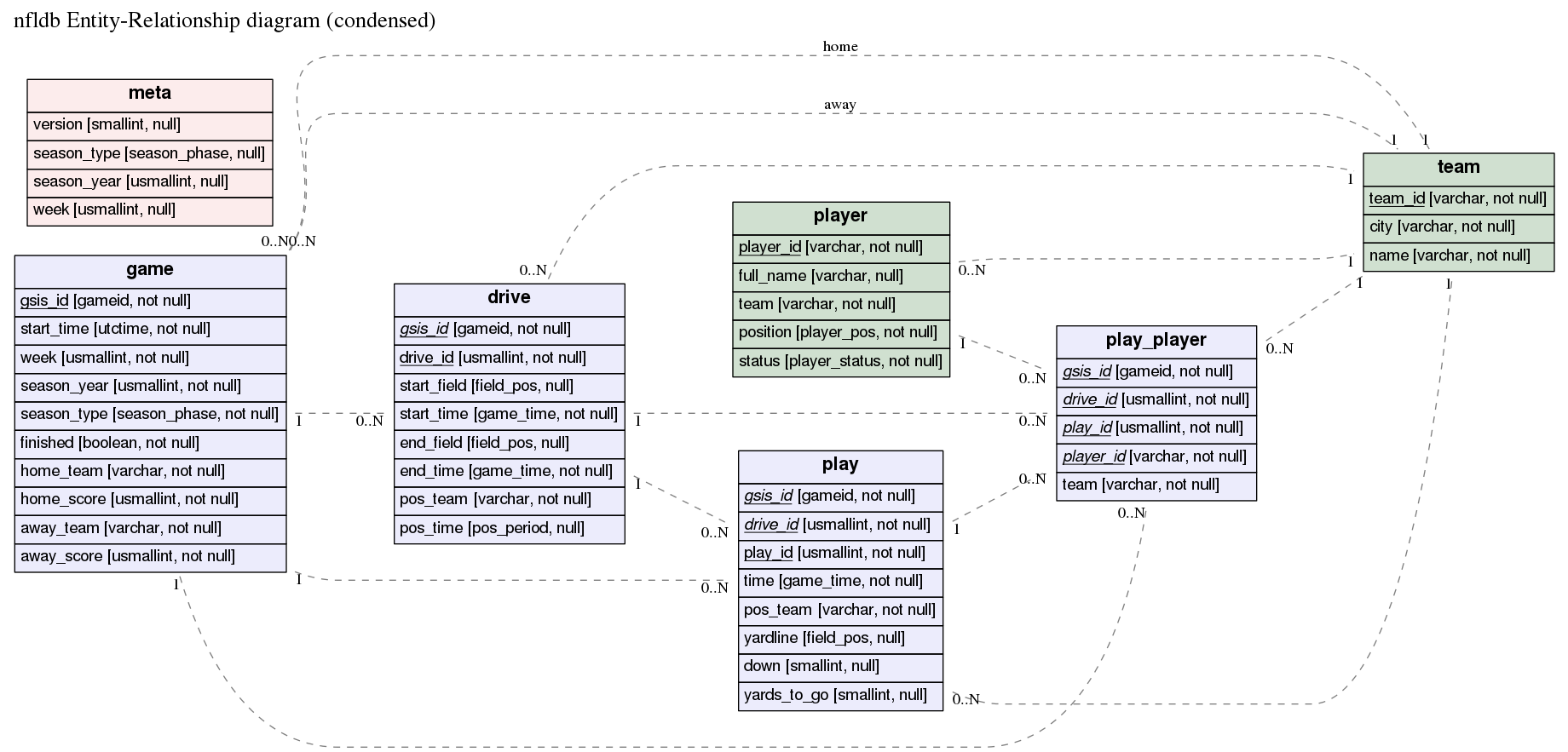
Here's an example of the output produced by `erd` (click on it for a larger PDF
version):
[](https://raw.githubusercontent.com/BurntSushi/erd/master/examples/nfldb.pdf)
The [corresponding `er` file is in the `examples`
directory](https://github.com/BurntSushi/erd/blob/master/examples/nfldb.er).
### Installation
`erd` requires [GraphViz](http://www.graphviz.org/download/), and one of:
* [Stack](http://docs.haskellstack.org/en/stable/README/)
* [Haskell Platform](http://www.haskell.org/platform/)
All of these are available for Windows, Mac and Linux.
#### MacPorts
`erd` is available in MacPorts as a one-shot install (GraphViz will be set up correctly for you):
```
port install erd
```
#### Docker
An example command to use _erd_ in a _docker_ container, once this repository is successfully cloned.
```
erdtag="0.2.1.0"; cd erd && docker build -t erd:$erdtag . && docker run -it erd:$erdtag "--help"
```
Where:
- you shall specify your _erdtag_, that will help identifying the docker image to be created;
- instead of using `--help` invoke _erd_ the way you need to i.e.:
```
docker run -i erd:$erdtag "--dot-entity" < examples/nfldb.er > out.pdf
```
#### Stack
Install the [Stack](http://docs.haskellstack.org/en/stable/README/) build tool,
and build from source:
git clone git://github.com/BurntSushi/erd
cd erd
stack install
`stack install` will put the binary into Stack's standard binary
installation path. Unless you've overridden it, that's `~/.local/bin`
on Unix and OS X, `%APPDATA%\local\bin` on Windows.
#### Haskell Platform
> _NB OSX users_: for text formatting of keys (bold and italics) you may need to reinstall `graphviz` with `pango` support:
```
# OSX only
brew install graphviz
```
[The issue 1636](https://gitlab.com/graphviz/graphviz/issues/1636) explains what needs to be performed in details to find out whether _pango_ support is enabled and how to make it happen in case it wasn't.
[erd is on hackage](http://hackage.haskell.org/package/erd), so you can install
it with cabal (which is included with the Haskell platform):
cabal new-install erd
Alternatively, you can clone this repository and build from source:
git clone git://github.com/BurntSushi/erd
cd erd
cabal new-configure
cabal new-build
# binary is now under ./dist-newstyle/build/
Usage information is available with `erd --help`.
### Building statically linked executable
In case one wishes to have a statically linked `erd` as a result, this is
possible to have by executing `build-static_by-nix.sh`: which requires the
[nix](https://nixos.org/nix/) package manager to be installed on the building
machine. NixOS itself is not a requirement.
### Quick example
Before describing the ER file, let's try making an ER diagram from a small
example:
```bash
$ curl 'https://raw.githubusercontent.com/BurntSushi/erd/master/examples/simple.er' > simple.er
$ cat simple.er
# Entities are declared in '[' ... ']'. All attributes after the entity header
# up until the end of the file (or the next entity declaration) correspond
# to this entity.
[Person]
*name
height
weight
`birth date`
+birth_place_id
[`Birth Place`]
*id
`birth city`
'birth state'
"birth country"
# Each relationship must be between exactly two entities, which need not
# be distinct. Each entity in the relationship has exactly one of four
# possible cardinalities:
#
# Cardinality Syntax
# 0 or 1 ?
# exactly 1 1
# 0 or more *
# 1 or more +
Person *--1 `Birth Place`
$ erd -i simple.er -o simple.pdf
```
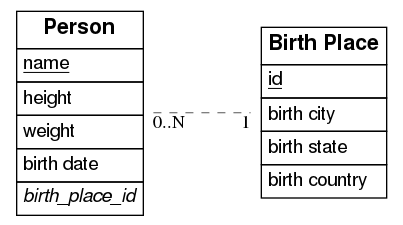
The PDF should now contain a graph that looks like this:
### Available command-line options
| Short | Long | Description |
|-------------|------------------------|--------------------------------------------------------------------------------------------------------------------------------------------------------------------------------|
| -c[FILE] | --config[=FILE] | Configuration file. |
| -i FILE | --input=FILE | When set, input will be read from the given file. Otherwise, stdin will be used. |
| -o FILE | --output=FILE | When set, output will be written to the given file. Otherwise, stdout will be used. If given and if --fmt is omitted, then the format will be guessed from the file extension. |
| -f FMT | --fmt=FMT | Force the output format to one of: bmp, dot, eps, gif, jpg, pdf, plain, png, ps, ps2, svg, tiff. |
| -e EDGE | --edge=EDGE | Select one type of edge: compound, noedge, ortho, poly, spline. |
| -d | --dot-entity | When set, output will consist of regular dot tables instead of HTML tables. Formatting will be disabled. |
| -p PATTERN | --edge-pattern=PATTERN | Select one of the edge patterns: dashed, dotted, solid. |
| -n NOTATION | --notation=NOTATION | Select a notation style for cardinalities of relations: ie, uml. |
| -h | --help | Show this usage message. |
### Formatting defined in configuration file
`erd` may be invoked using the _-c_ or _--config_ argument
- without a provided configuration file it will try to read the file
_~/.erd.yaml_ which is the path of the configuration file to store formatting
settings of any resulted graph. In case the file _~/.erd.yaml_ does not exists
`erd` will print the default content of this file to stdout which you can
inspect and/or redirect appropriately, e.g.: ```erd -c -i ./examples/nfldb.er
-o ./nfldb.pdf 1 > ~/.erd.yaml``` .
- with a provided configuration file erd will use that instead of _~/.erd.yaml_.
For instance: ```erd -c./myconfig.yaml -i ./examples/nfldb.er -o ./nfldb.pdf```
.
The configuration file in commented sections do contain the supported formatting
options, so you can use one of the listed ones.
The default content of the configuration file would be only shown when
_~/.erd.yaml_ does not exist.
### The `er` file format
The `er` format allows one to describe a relational schema in terms of its
entities (tables), attributes (columns) and relationships between entities (0
or 1, exactly 1, 0 or more and 1 or more).
Entities are declared inside `[` and `]`. For example, this declares the entity
`Person` with no attributes:
```
[Person]
```
Attributes for an entity are then listed after its corresponding entity's
declaration. Each attribute should be on its own line. The following adds the
`name` and `height` attributes to the `Person` entity:
```
[Person]
name
height
```
Entity names and attributes may contain spaces and mostly any character,
except ASCII control characters like carriage return and line feed,
if quoted with backticks, simple quotes or double quotes:
```
[`Birth Place`]
*id
`birth city`
'birth state'
"birth country"
```
Any number of attributes may be declared as a primary key for its entity by
prefixing the attribute with a `*`. Similarly, an attribute may be declared
as a foreign key by prefixing the attribute with a `+`:
```
[Person]
*name
+birth_place_id
```
An attribute may be *both* a primary key and a foreign key by prefixing the
name with a `*` and a `+` in any order. Note that primary keys are underlined
while foreign keys are italicized.
Relationships can also be declared *anywhere in an ER file*. Every relationship
includes exactly two entities (the two entities may be the same, for
self-relationships). Each entity in a relationship **must** have exactly one of
four cardinalities:
```
Cardinality Syntax
0 or 1 ?
exactly 1 1
0 or more *
1 or more +
```
So for example, the following defines a relationship between `Person` and
`Birth Place` that reads "every person has exactly one birth place":
```
Person *--1 `Birth Place`
```
And here's another example that can be read as, "every platinum album has one
or more artists, but not every artist has a platinum album":
```
Artist +--? PlatinumAlbums
```
### Fonts, colors, labels, ...
The `er` format also has limited support for customizing the appearance of your
ER diagram. For example, the following will show the entity with a background
color of `#ececfc` and a font size of `20`:
```
[Person] {bgcolor: "#ececfc", size: "20"}
name
height
weight
```
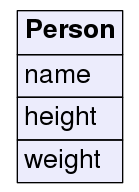
Which looks like:
Alternatively, you can specify the background color of every entity with a
special directive at the top of the file:
```
entity {bgcolor: "#ececfc", size: "20"}
[Person]
name
height
weight
[`Birth Place`]
place
```
There are three other directives: `title`, `header` and `relationship`. The
`title` directive allows one to specify a title for the graph and provide
options for formatting it. The `header` directive allows one to customize the
formatting of every entity header. And similarly for `relationship`. Note that
global options are overwritten by local options.
Note that directives **must come before anything else in an ER file**.
Here's an example depicting the first schema shown at the top of this README
(note that this is auto-generated by
[nfldb-write-erd](https://github.com/BurntSushi/nfldb/blob/master/scripts/nfldb-write-erd)):
```
title {label: "nfldb Entity-Relationship diagram (condensed)", size: "20"}
# Entities
[player] {bgcolor: "#d0e0d0"}
*player_id {label: "varchar, not null"}
full_name {label: "varchar, null"}
team {label: "varchar, not null"}
position {label: "player_pos, not null"}
status {label: "player_status, not null"}
[team] {bgcolor: "#d0e0d0"}
*team_id {label: "varchar, not null"}
city {label: "varchar, not null"}
name {label: "varchar, not null"}
[game] {bgcolor: "#ececfc"}
*gsis_id {label: "gameid, not null"}
start_time {label: "utctime, not null"}
week {label: "usmallint, not null"}
season_year {label: "usmallint, not null"}
season_type {label: "season_phase, not null"}
finished {label: "boolean, not null"}
home_team {label: "varchar, not null"}
home_score {label: "usmallint, not null"}
away_team {label: "varchar, not null"}
away_score {label: "usmallint, not null"}
[drive] {bgcolor: "#ececfc"}
*+gsis_id {label: "gameid, not null"}
*drive_id {label: "usmallint, not null"}
start_field {label: "field_pos, null"}
start_time {label: "game_time, not null"}
end_field {label: "field_pos, null"}
end_time {label: "game_time, not null"}
pos_team {label: "varchar, not null"}
pos_time {label: "pos_period, null"}
[play] {bgcolor: "#ececfc"}
*+gsis_id {label: "gameid, not null"}
*+drive_id {label: "usmallint, not null"}
*play_id {label: "usmallint, not null"}
time {label: "game_time, not null"}
pos_team {label: "varchar, not null"}
yardline {label: "field_pos, null"}
down {label: "smallint, null"}
yards_to_go {label: "smallint, null"}
[play_player] {bgcolor: "#ececfc"}
*+gsis_id {label: "gameid, not null"}
*+drive_id {label: "usmallint, not null"}
*+play_id {label: "usmallint, not null"}
*+player_id {label: "varchar, not null"}
team {label: "varchar, not null"}
[meta] {bgcolor: "#fcecec"}
version {label: "smallint, null"}
season_type {label: "season_phase, null"}
season_year {label: "usmallint, null"}
week {label: "usmallint, null"}
# Relationships
player *--1 team
game *--1 team {label: "home"}
game *--1 team {label: "away"}
drive *--1 team
play *--1 team
play_player *--1 team
game 1--* drive
game 1--* play
game 1--* play_player
drive 1--* play
drive 1--* play_player
play 1--* play_player
player 1--* play_player
```
### All formatting options
`erd` only exposes a subset of formatting options made available by GraphViz.
I'm not entirely opposed to expanding this list if there's a compelling reason
to do so, but I'd prefer to keep it small and simple.
Note that not all options are applicable on all items. For example, a title
cannot have a background color (it will just be ignored by GraphViz).
Colors can be specified in hexadecimal notation prefixed with a `#`, e.g.,
`#3366ff` or they may be [written as their English
names](http://hackage.haskell.org/package/graphviz-2999.8.0.0/docs/Data-GraphViz-Attributes-Colors.html#t:X11Color).
* **label** A plain text string used to label the item. For entity names and
attributes, a label is shown next to the name in square brackets. For
relationships, a label is drawn near the center of the edge. For the special
`title` directive, the label corresponds to the graph title.
* **color** Specifies the font color. Valid everywhere.
* **bgcolor** Specifies the background color. Only valid for entities and
attributes.
* **size** Specifies the font size. Valid everywhere.
* **font** Specifies the font. Valid everywhere. See
[this](http://www.graphviz.org/doc/fontfaq.txt) and
[this](http://www.graphviz.org/doc/info/attrs.html#d:fontname) for
information about fonts in GraphViz. TL;DR: Stick with one of the following:
`Times-Roman`, `Helvetica` or `Courier`.
* **border-color** Border color. Only works for entities or attributes.
* **border** Border size in pixels. Only works for entities and attributes.
Formatting options are always specified as key-value pairs in curly braces,
where the opening curly brace starts on the same line as the
entity/attribute/relationship/directive. The option name precedes a colon and
the option value comes after the colon in double quotes (even for integer
values). The value is then proceded by either a comma or an ending curly brace.
Also note that trailing commas are allowed and that options may be specified
over more than one line. For example, the following is a valid `er` file:
```
[Person]
name {
label: "string",
color: "#3366ff", # i like bright blue
}
weight {
label: "int",}
```
### Philosophy
I don't intend for `erd` to have a large feature set with a lot of options for
customizing the appearance of ER diagrams. `erd` should produce diagrams that
are "good enough" from simple plain text descriptions without a lot of
complexity. `erd` will implicitly trust GraphViz to "do the right thing"
without a lot of fiddling with its options.
If you have more exotic needs, then I suggest that either `erd` is not the
right tool, *or* you could use `erd` to output an `er` file as a `dot` file.
You can then customize it further manually or using some other tool.
You can output a `dot` file using the `--fmt` option or by simply using it as
a file extension:
erd -i something.er -o something.dot
### Similar software
The format of the `er` file is inspired by the file format used by the project
[erwiz](https://github.com/slopjong/Erwiz) (which looks abandoned). The `er`
format is a bit more lightweight, but its general structure is similar.
Similar software that translates a plain text description of a relational
schema to a graphical visualization (the list may be incomplete and some of
the listed projects are no longer maintained):
* C#
* [erd-dotnet](https://github.com/frolic06/erd-dotnet)
* Go
* [erd-go](https://github.com/kaishuu0123/erd-go/)
* [erdm](https://github.com/unok/erdm)
* [erd](https://github.com/k-kawa/erd)
* Java
* [erwiz](https://github.com/slopjong/Erwiz)
* [PlantUML](https://github.com/plantuml/plantuml)'s
[ERD syntax](https://plantuml.com/ie-diagram)
* JavaScript
* [t2erd](https://github.com/dosaki/t2erd)
* [mermaid](https://github.com/mermaid-js/mermaid)'s
[ERD syntax](https://mermaid-js.github.io/mermaid/#/entityRelationshipDiagram)
* Python
* [ERDot](https://github.com/ehne/ERDot)
* Ruby
* [text_to_diagram](https://github.com/japgolly/text_to_diagram)
* Rust
* [erd-rs](https://github.com/davechallis/erd-rs)
* Propertiary, web-based tools:
* [dbdiagram.io](https://dbdiagram.io/d)
* [quickdatabasediagrams.com](https://app.quickdatabasediagrams.com/#/)
### Text editor support
* [Vim syntax file](https://github.com/flniu/er.vim) for the `er` file format.
* [Visual Studio Code ERD preview](https://github.com/kaishuu0123/vscode-erd)
* [Visual Studio Code syntax highlighting](https://github.com/mikkel-ol/vsc-er-syntax-highlighting)